You Do Not Need Every Agent


On July 17, Peter Steinberger, the creator of OpenClaw, posted a short question on X: “Are we still talking loops or did we shift to graphs yet?”
Are we still talking loops or did we shift to graphs yet?
— Peter Steinberger 🦞 (@steipete) July 18, 2026
This post is also available on Medium. If you’re a paid Medium member and happen to read it there, it helps fund my next cup of coffee. Much appreciated ☕️😄
I took it as a joke, but it captured something that has made me uncomfortable about recent conversations around AI agents. We had prompt engineering, then context engineering, then harness engineering. Soon everyone was talking about loops. Now perhaps loops are already old and we are supposed to think in graphs. Each term seems to describe something real, but people rarely stop to define what kind of thing it is: a component of the system, a design pattern, a new engineering paradigm, or simply the latest trend. Instead, they are presented as a sequence of replacements, each another thing I am expected to follow. If I learned the previous term last week, I can easily feel that I am behind again this week.
The product names make this worse. ChatGPT, Claude, ChatGPT Work, Claude Cowork, Codex, Claude Code, Hermes, OpenClaw, Atlas, and Aside can all be described as agentic systems. They can sometimes perform the same task. Yet they are not all the same kind of thing, and they do not represent a simple progression from less advanced to more advanced.
I do not like the resulting sense of obligation. A new agent appears and the immediate reaction is that I should install it, learn it, or move an existing workflow to it before that workflow becomes obsolete. The use case either disappears or gets attached afterward to justify the new architecture. The architecture becomes the objective.
So I want to work in the other direction. First, I will separate the pieces that make up an agentic system. Then I will put those AI products into categories that can be compared honestly. Finally, I will give all of them one ordinary job: prepare a daily brief from current news and several email accounts. The differences become much clearer when the result, rather than the terminology, stays fixed.
This description is current as of August 2, 2026. That date matters more than I would like. Some of these products have changed substantially within months, and one of them is scheduled to disappear a week after I am writing this.
The stack underneath the name
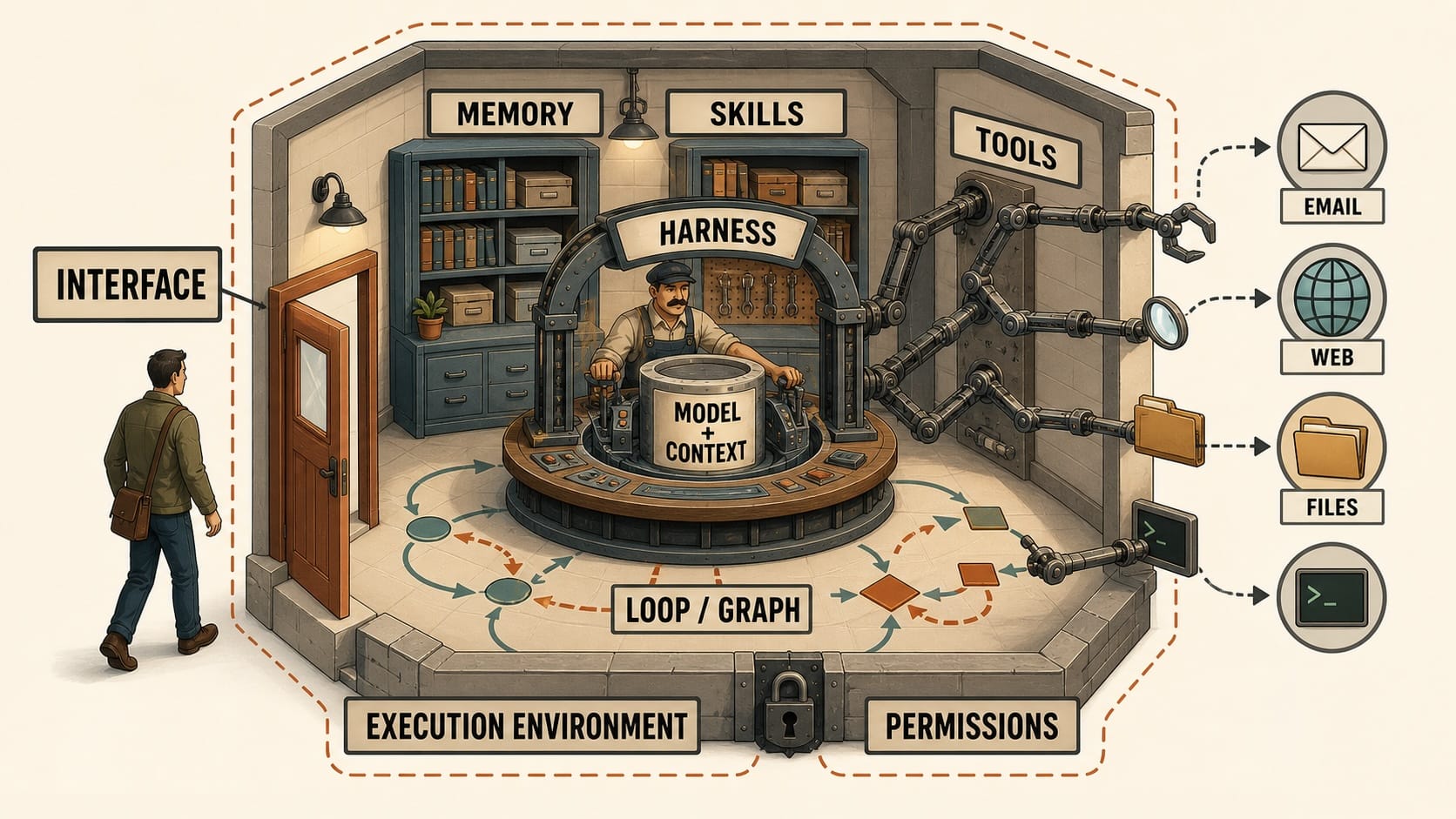
I find it useful to picture an agentic system as a workshop rather than a single machine. The interface is only the door. Inside, the harness coordinates the model and its context, memory and skills retain useful material, and tools reach into the surrounding world. The execution environment and its permissions determine the boundary of the workshop, while loops and graphs describe the paths the work takes inside it.
The language model is the easiest layer to recognize. GPT and Claude model families belong here, but their product names do not. GPT is not ChatGPT, and a Claude model is not automatically Claude Code. The name Claude is especially overloaded: it can refer to Anthropic's models, its conversational assistant, or, in shorthand, Claude Code. An agent that calls a Claude model through an API is not thereby using the Claude Code harness. If it delegates work to Claude Code, that is a different architectural claim.
The model interprets the request and produces language, code, images, or tool calls. It supplies much of the reasoning ability, but by itself it does not have my Gmail accounts, a durable memory, a folder on my Mac, or permission to click a button. Saying which model an agent uses identifies its reasoning engine, not the complete system around it.
Context is what the model can see during a particular run. It can contain my prompt, the conversation so far, selected files, search results, project instructions, and information retrieved from memory. A context window is temporary input to the model. It is not the same as a persistent workspace or a product remembering my preferences next week, even though those things may be loaded into the context when the next run begins.
Memory is information that the surrounding system preserves and makes available again later. It may contain preferences, project facts, previous decisions, or summaries of earlier sessions. The model has not permanently learned these things. The harness stores or retrieves them, then places the relevant pieces back into context for another run.
Tools are how the model reaches beyond that context. A web-search tool retrieves current information. A file tool reads or writes a document. A connector provides structured access to Gmail, Google Drive, Slack, or another service. MCP is a protocol that lets a compatible system expose tools and resources. A command-line program can also become a tool. If I already use a mail CLI that can see several accounts, an agent capable of running that command may be able to use the access I have already configured.
Skills sit nearby, but they solve a different problem. A skill packages instructions, examples, scripts, and other resources for a repeatable workflow. It can teach an agent how I want a daily brief written or which commands to use, but it does not grant access by itself. The distinction matters. Instructions about how to read Gmail are not Gmail credentials.
The harness, or agent runtime, is the machinery that turns model calls into an agent. It assembles the prompt and context, offers tools, executes tool calls, applies permission rules, records state, handles errors, and decides whether the job is finished. Most commercial products contain a harness even when the user never sees it. Hermes and OpenClaw expose much more of theirs because operating and configuring the runtime is part of the product.
This is where loops and graphs belong. A basic agent loop asks the model what to do, runs the requested tool, returns the result to the model, and repeats until the model stops. A graph makes more of the control flow explicit. It can split research across several branches, run workers in parallel, insert a review step, or route failures somewhere else. A graph can contain loops, and a loop can be one node in a graph. Neither term tells me whether the agent can read my second Gmail account or save a Markdown file where I want it.
The execution environment tells me where the work actually happens. It might be a provider's cloud, an isolated virtual machine, a folder on my computer, a Git repository, a browser profile, or a server I operate. This layer determines which files, commands, applications, credentials, and networks the agent can reach. In practice, the environment often matters more than a small difference between models.
Permissions cut across the harness, tools, and environment. The environment determines what is within reach; permissions determine what the agent may actually do with it, what requires my approval, and what remains forbidden. An agent may be able to see an inbox without being allowed to send mail, or write inside one folder without being allowed to inspect the rest of the disk.
Finally, there is the interface. Chat, CLI, IDE extension, desktop app, web app, mobile app, and messaging channel are ways to reach an agent. The interface is the doorway, not the room behind it. A terminal, desktop window, and mobile conversation may offer different ways into the same kind of agent, while two products that both look like chat may lead to completely different tools, permissions, and execution environments. Codex CLI is one interface to Codex, not the entirety of Codex. Claude Code began as a terminal-centered product, but it also runs through desktop, cloud, IDE, and remote environments. Calling either product “a CLI” now hides more than it explains.
One common word does not fit neatly into this stack: platform. It is not another layer. It is an overloaded label for a product that packages several layers together. It can mean a hosted product that operates an agent for me, a self-hosted system that manages models and tools, or a developer framework used to build a new agent. OpenAI's Agents SDK and graph frameworks belong to the third group. They are relevant if I want to construct an agent product, but they are not alternatives to ChatGPT in the way most users mean the question.
A useful working definition emerges from the stack: an agent is a model operating through a harness, with context, memory, and tools, inside an environment, under a set of permissions, toward some definition of done. The product determines how much of that stack is already assembled and how much remains my responsibility.
Which products should actually be compared
As of August 2026, the most useful comparisons look like this:
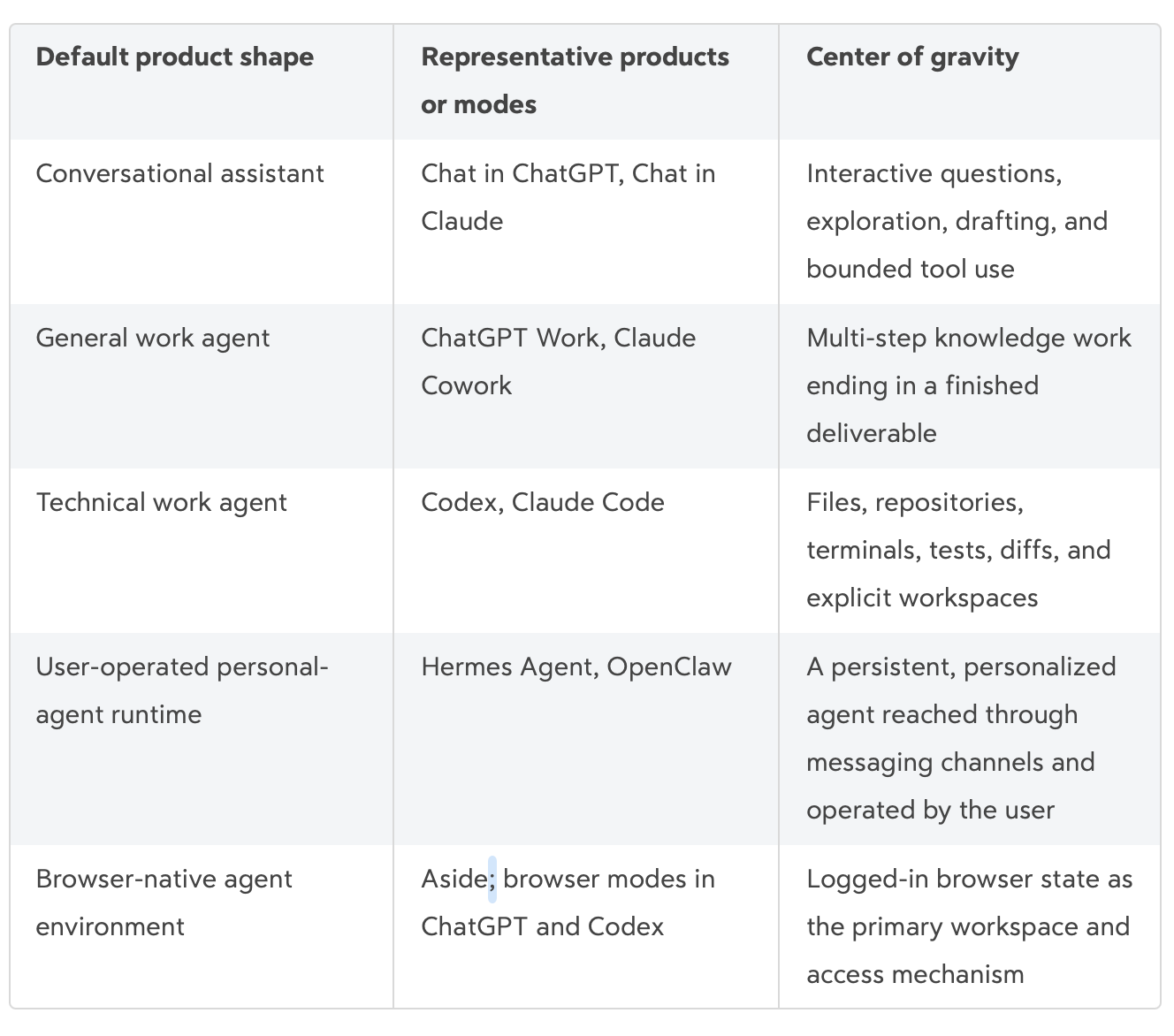
The rows are not hard walls. They describe the experience each product assembles by default, not a boundary around what it can do. Some rows classify the work being optimized, while others identify who operates the system or which environment it treats as primary. Chat products now use tools and create files. Coding agents can research, write reports, generate images, and operate browsers. User-operated agents can behave like chat assistants or coding agents depending on how they are configured. The category identifies what the product packages most naturally, not everything it can possibly do.
In the table, “Chat in ChatGPT” and “Chat in Claude” are descriptive shorthand for the ordinary conversational modes, not additional product names. The current names also correct a common source of confusion. OpenAI calls its general work product ChatGPT Work, not Codex Work. Anthropic calls its counterpart Claude Cowork, not Claude Work. OpenAI's own guide separates the three experiences directly: Chat for quick conversational help, Work for longer tasks and finished deliverables, and Codex for software development and technical work. Anthropic's desktop documentation presents a similar division among Chat, Cowork, and Code.
The ordinary Chat modes in ChatGPT and Claude are therefore the closest pair. They are conversation-centered assistants. That no longer means they merely predict the next paragraph. They can search the web, use connected services, analyze uploaded files, remember preferences, and create artifacts. The important characteristic is that the conversation remains the primary unit of work. I ask, inspect the answer, and continue.
ChatGPT Work and Claude Cowork move the emphasis from an answer to an outcome. I can ask for a brief, deck, spreadsheet, report, or recurring update and let the provider-managed harness decide how to complete the intermediate steps. Both products can work remotely, and both have ways to reach local files and applications when the corresponding desktop software and permissions are available. They package the environment, artifact tools, progress reporting, and review experience for someone who does not want to assemble those pieces.
They also package an execution boundary. Their remote sessions run in provider-managed isolated environments. When they reach local files, browsers, or desktop applications, the boundary changes: access depends on connected folders, application permissions, and the surface being used. This is why “sandboxed” should describe a particular execution mode rather than the product as a whole.
Codex and Claude Code are another pair. Their center of gravity is an explicit technical environment. Codex can work through its app, CLI, IDE extension, cloud environments, and remote machines. Claude Code has comparable local, desktop, cloud, IDE, and remote modes. The value is not simply that they produce better code. They can inspect a real folder, run commands, change files, check the result, and show me what changed. That makes them useful for non-code work too, as long as the work benefits from scripts, files, and an inspectable workspace.
Hermes Agent and OpenClaw are different again. They are not merely open versions of ChatGPT. They move the operating boundary toward the user. I operate more of the runtime or gateway and choose the model providers, credentials, tools, memory, schedules, and communication channels. Hermes presents the learning agent and its flexible execution backends as the center. OpenClaw presents the gateway, persistent assistant, and messaging channels as the center.
The distinction is one of emphasis rather than a clean category boundary. Both let me choose more of the stack, and both make me responsible for more of it.
Browser-native agent environments solve access differently. Instead of waiting for a structured connector, they operate the website that I already use and treat authenticated browser state as part of the workspace. Aside describes itself as a browser built for people and agents, able to work across logged-in websites and local files without requiring a separate integration for each site. Browser use can also be one tool inside ChatGPT, Codex, Cowork, Hermes, or OpenClaw, so this row identifies an environment rather than an exclusive class of product.
The same job can cross these rows. I could implement a software feature with a purpose-built coding agent or with Hermes, and both could even run Fable underneath. The results may still differ because the model is only one part of the system. The coding agent arrives with a harness designed for exploring repositories, editing files, running commands and tests, reviewing diffs, and preserving project context. Hermes can be configured for the same work and may eventually fit a particular workflow better, but then I am designing and maintaining more of the harness myself.
“Better” therefore means better assembled for this task, not universally more intelligent. The difference comes from how the harness combines context, tools, instructions, permissions, validation, retries, and the execution environment. That judgment can also change quickly as products add new tools, environments, and interfaces. This map is a dated snapshot of their defaults, not a permanent assignment of capabilities.
ChatGPT Atlas used the same broad idea, but it is already a useful warning against organizing my understanding around brand names. OpenAI launched Atlas in October 2025 and is now deprecating it on August 9, 2026, moving its browser-agent capabilities into ChatGPT and Codex. Atlas the product is disappearing. Browser-based agentic work is not. The category is more durable than the name.
E.V., the Inhibitor, and the workshop
This section contains a minor spoiler for Spider-Man: Brand New Day.
On August 1, the day after it opened, I watched Spider-Man: Brand New Day. One sequence gave me a fresher metaphor for the personal-agent category. Peter Parker works with E.V., the AI assistant he built himself, as he develops the Inhibitor, a chip intended to suppress unwanted biological mutations.
The process looks like vibe coding, but it also goes beyond the way vibe coding is usually demonstrated. Peter begins with an intention, works through it with the AI, responds to feedback, and keeps building until the idea becomes a physical artifact. The conversation matters, but so do the data, machinery, experiments, and state that persist around it. E.V. is not merely answering questions. It is participating in a working environment that Peter continues to inspect and change.
The scale makes the example especially useful. Peter no longer has Stark money or equipment. He has an improvised apartment workshop, an AI assistant of his own, and a homemade fabricator. A contemporary description of the film calls this a low-budget version of an advanced inventor's workshop and emphasizes that E.V. appears to be Peter's own creation rather than inherited technology. This resembles how people are actually assembling agent systems: a capable model surrounded by whatever tools, machines, accounts, and software they can connect.
Hermes and OpenClaw make this image easy to imagine because the agent can live in the same messaging channels that I already carry everywhere. I can send a thought from Telegram or WhatsApp, let the agent use tools on another machine, and receive the result later. Memory gives that agent some continuity. Hermes stresses this more explicitly, with separate stores for facts about the environment and a profile of the user's preferences, plus search across earlier sessions. OpenClaw also remembers preferences, decisions, and recent activity, but its product center is closer to a persistent gateway through which channels, sessions, workspaces, and agents are routed. So I think it is fair to group them together, while recognizing that personalization is more central to Hermes's stated identity.
The large hosted products are moving toward the same experience. Claude Cowork's Dispatch provides one continuous conversation on phone and desktop. Claude decides whether a request should become a Claude Code or Cowork session, runs it on the desktop, and reports the outcome back to the conversation. OpenAI approaches the idea somewhat differently. Codex in the ChatGPT mobile app can reach the live state of multiple tasks running across connected machines. I can start a new thread, return to an existing one, inspect diffs and test results, and approve the next step. That is closer to a remote cockpit for several workshops than one personal assistant standing between me and all of them.
The Inhibitor sequence does not show Peter working through a chat log alone. The workshop remains visible. The design becomes a chip. Partial results, equipment, and the condition of Peter's own body provide state outside the conversation. Peter can look past E.V.'s response and inspect the work itself. The conversation is a control surface, but it is not the only place where the work exists.
A messenger-centered personal agent can lose that second half of the metaphor. Every request enters through one relationship, then the personal agent routes it somewhere, compresses what happened, and returns an answer. If I remain in that channel, the agent becomes a man in the middle between me and each task. Exact constraints can be softened during the handoff. Evidence and intermediate decisions can disappear from the summary. Unrelated projects can bleed into the same conversation. Persistent memory may preserve an old assumption long after the task that produced it has changed.
This is a workflow risk rather than an unavoidable flaw in Hermes or OpenClaw. Hermes supports separate profiles with their own memory, skills, sessions, and state. OpenClaw has distinct agents, workspaces, sessions, and task records. Claude Dispatch creates separate Code and Cowork sessions that I can open from their sidebars. The systems can retain task boundaries. The danger appears when the personal channel becomes so convenient that I stop visiting them.
I would therefore treat the personal agent as a front door, not as the filing cabinet. It can remember stable preferences, decide where a request belongs, notify me, and provide a concise result. The detailed state should remain with a task-specific thread or workspace: the original request, sources, files, tool activity, decisions, errors, and artifact history. A good response from the personal agent should bring back not only the outcome, but also a route into that workspace when I need to inspect or continue the work.
For the daily brief, the distinction is concrete. The personal memory can know that I care about certain sources, prefer a short summary, and want it at 7 a.m. Each morning's run should still have its own record of which accounts were searched, which messages were selected, which sources failed, and where the Markdown file was written. The message on my phone is the entrance to that work, not its only surviving context. That is closer to Peter and E.V. building the Inhibitor around a shared workbench than to E.V. reduced to a chat bubble.
For now, this is also why I prefer separate task sessions. I do not think one personal agent yet does every kind of work as well as a specialized workspace with its own context and tools. I want the personal channel to help route and reconnect the work, not replace those workspaces. If personal agents evolve into something closer to E.V. in Peter's workshop, preserving rich task state, choosing the right environment, and letting me inspect the artifact as it develops, I may change my position. These systems keep changing, so this preference is a snapshot rather than a doctrine.
One job, five routes
Suppose I want a daily highlights brief. It should find a small number of meaningful news items from sources I trust, examine the messages that matter across my personal and work Gmail accounts, separate urgent items from things that can wait, and give me links back to the originals. I want a dated Markdown file saved in a known folder. For the first few runs I will start it manually. If the result is reliable, I may schedule it for each morning.
The email part is read-only. The system should not send, archive, label, or delete anything. That boundary is part of the task, not an optional safety note.
This is not primarily a reasoning problem. It is an access, environment, persistence, and trust problem. Almost every product in this article can write a plausible summary. The meaningful question is how it obtains the information and what authority it receives along the way.
The simplest route is an ordinary ChatGPT or Claude conversation. I connect Gmail, ask the assistant to search current news, and request a summary. For a one-time brief, this may be enough. It has the lowest setup cost and the easiest review loop. I can correct the emphasis immediately if the assistant focuses on the wrong news or treats a newsletter as an urgent email.
The limitation appears when I ask what “connect Gmail” means. A connector is authorized against a specific account and a specific set of scopes. ChatGPT's Google-app documentation says that it can access content from the Google account I choose to connect. If I have several accounts, the model cannot make them one inbox by reasoning harder. The product must support the connections, my organization must permit them, and the task must identify which account each result came from. This is a connector problem, not a ChatGPT-versus-Claude problem.
The instruction to remain read-only also has two meanings. I can tell the agent not to change anything, but the connected credential may still have permission to do so. OpenAI's documentation lists gmail.modify among the scopes used when Gmail actions are enabled. A behavioral rule in the prompt is useful, but it is weaker than a connector that is technically incapable of modifying the inbox. When the narrower permission is available, I would prefer it.
There is also the destination. A chat assistant can create a file for me to download, so it is no longer accurate to say that ChatGPT simply cannot produce files. But a downloadable artifact inside a web conversation is different from writing 2026-08-02.md directly into a folder on my computer. The first route ends with me placing the file. The second requires a local execution environment with access to that folder.
ChatGPT Work or Claude Cowork is the more natural managed route. The task has a clear outcome, several sources, and an artifact to review, exactly the kind of work these products are designed to accept. Both can use connectors and web research. Both can create finished files. Both now support scheduled work. Claude's scheduled tasks can use configured connectors, run as separate Cowork sessions, and continue remotely even when the desktop app is closed.
The important distinction inside this route is local versus remote. Claude explicitly says that remote scheduled tasks continue while the computer is asleep, which is ideal for a 6 a.m. brief. Cloud Work similarly avoids dependence on a local folder, but it cannot automatically write into an arbitrary directory on my Mac. Desktop Work can use a selected local folder, but then the files, outputs, and execution remain tied to that computer.
This is why an apparently simple statement such as “ChatGPT cannot save locally, while Codex can” has become too crude. ChatGPT Work on the desktop can use local files. Cloud Work can create files that follow the cloud conversation. Codex can work directly inside a selected local folder. The real difference is not the logo. It is which execution mode I selected and which path I authorized.
Codex or Claude Code offers a more technical route. I can open a folder called daily-briefs, give the agent permission to write there, and have it create a dated Markdown file. For email, I can expose a structured connector, an MCP server, or a local mail CLI. In my own setup, the Spark CLI could supply access to several accounts while Codex handles the workflow and file output. The agent can also leave behind the script, prompt, logs, and configuration that produced the brief. I can put those artifacts in version control and see exactly what changed.
This route is attractive when reproducibility and local ownership matter. It also makes the missing pieces visible. Codex does not magically know how to authenticate to my inbox because it can run a terminal. I still have to provide a tool and decide how its credentials are stored. The sandbox can restrict the agent to the selected workspace and require approval for broader access, but I have to grant network or service access when the task needs it. Claude Code has the same basic reality: direct file and command access is useful precisely because it is powerful and must be bounded.
A technical work agent may also be excessive for a morning brief. I am effectively treating a personal information habit as a small software project. That is worthwhile if I want a durable, inspectable pipeline. It is needless ceremony if I only want to glance at today's messages once.
The browser route solves the account problem in another way. If I am already signed into personal Gmail, work Gmail, news sites, and internal dashboards in the browser, Aside can in principle work through those sessions just as I do. There is no need to wait for every service to publish an API or for every agent vendor to ship a connector. Multiple sources become sites inside an already authenticated browser context.
The benefit is universality. The cost is that a browser is a very broad and somewhat fragile tool. A connector can expose a narrow operation such as searching messages. A browser agent may see the entire page and operate through the same authenticated session that I use. Aside places confirmation gates around sensitive actions, but a confirmation gate does not make the underlying browser session read-only. The session still has broader reach than a connector limited to searching messages. Web interfaces also change, login prompts appear, and a previously reliable sequence can fail halfway through.
There is a deeper security problem too. Email and web pages are untrusted input. A malicious message can contain instructions aimed at the agent rather than at me. This is prompt injection with real credentials nearby. Aside says its password manager can sign the agent in without revealing the password to the model, which is a useful boundary, but hiding the password is not the same as limiting what an authenticated session can do. Browser agents reduce integration work by inheriting the user's reach. That reach is also their largest risk.
Hermes or OpenClaw is the route for turning the brief into a personal service. I can choose the model, attach Gmail through MCP or another tool, enable web search or browser access, give the agent a workspace, schedule a morning run, retain memory about which sources matter, and deliver the result through a file, dashboard, or messaging channel. Hermes includes cron and can save each scheduled output as a Markdown file. OpenClaw has cron for exact schedules, a heartbeat for context-aware periodic checks, and task records for inspecting background runs. I would want the message to link back to that run rather than replacing its records with a short conversational summary.
This is closest to the popular idea of an always-available personal agent. It is also the point where I become the system operator. I have to keep the gateway or runtime healthy, choose and pay for a model provider, protect credentials, update dependencies, review plugins and skills, inspect failures, and decide how much of my machine is exposed. A hosted Work agent hides much of that labor inside the provider. Hermes and OpenClaw give it back to me along with the control.
The safety mechanisms are real. Hermes documents command approvals, file-write protections, credential filtering, and container isolation. OpenClaw supports isolated workspaces and sandbox backends. But neither project claims that configuration disappears as a responsibility. OpenClaw's own security documentation warns that prompt injection can arrive through emails, documents, attachments, and browser pages even when only one trusted person can message the agent. For an inbox summary, that warning is not theoretical. Reading untrusted text is the job.
The five routes can produce almost the same Markdown file. They differ in everything behind it. Chat gives me the shortest path to a reviewed answer. Work and Cowork give me a managed path to a finished, possibly scheduled deliverable. Codex and Claude Code give me an explicit environment and inspectable artifacts. A browser agent gives me broad access through sessions I already use. Hermes and OpenClaw give me a persistent system that I can shape and operate.
None is simply the advanced version of the previous one.
The access method may matter more than the agent
The daily brief reveals three distinct ways of reaching the same information. A structured connector offers a defined service boundary. A CLI or MCP server makes that access reusable and inspectable, at the cost of setup and maintenance. A browser inherits the reach of an existing human session, which makes it the most universal route and the broadest security boundary.
These access methods do not belong exclusively to particular agents. They are components that can be rearranged. The same Gmail connector might serve ChatGPT, a work agent, or a personal-agent runtime. The same CLI might be called from Codex, Claude Code, Hermes, or OpenClaw. The same browser session might be operated through Aside or through a browser-capable mode in another product. What changes is how naturally the product assembles the route, how narrowly I can authorize it, and how much of the resulting work I can inspect.
The agent brand does not determine which route is used. Claude Cowork prefers a connector when one exists, then can fall back to browser or computer use. ChatGPT Work can use plugins, local apps, or its browser depending on the surface, with cloud browser available when a connected app cannot complete the task. Codex and Claude Code can call structured tools or operate a browser. Hermes and OpenClaw can be configured with any combination. “Which agent?” is therefore often the second question. The first is “How should this job reach my data?”
A small stack is enough
In the end, the email part of my daily brief did not require any of the elaborate routes I had been considering. I used the AI Chat feature in Spark, the email app I already use. It already had my accounts, and the feature was included in my existing subscription. There was no new connector to authorize, runtime to operate, or inbox structure to explain. For this particular job, it was the smoothest experience.
That answer is less dramatic than building a personal agent, but it reveals another mistake in the desire for one universal system. I do not need to concentrate every use case in the same agent. My email app may be the best place to summarize email, while a coding agent remains the best place to change a repository and a conversational assistant remains the best place to explore an unfinished idea. A personal stack can be several small systems with clear responsibilities rather than one agent standing between me and everything else.
The same rule applies to the rest of the brief: begin with the least elaborate system that satisfies the boundary, then add machinery only when a requirement forces it. A precise local destination, an inspectable history, unattended execution, or a source available only through a browser may justify a more elaborate route. Complexity should answer a requirement I can name.
This leads to a simpler evaluation than any agent leaderboard. What information does the task need? How does the system reach it? Where does the work run? Where does the result remain? What continues between runs? Which actions require approval? Who is responsible when the environment, credential, or integration breaks?
Those questions survive product launches. They also make the tradeoffs visible. Convenience often means trusting more of the provider's stack. Control often means maintaining more of my own. Broad browser access can remove connector friction but enlarges the security boundary. Persistent memory saves explanation but can preserve stale assumptions. Autonomous scheduling saves attention but shifts review away from intermediate steps and toward boundaries and results.
This is why I do not need every agent. The right stack may be one product or several, depending on the work I actually do. Adding another product should remove meaningful friction or create a capability I can name. A compelling demo is not itself a use case.
I would be equally cautious about trying to memorize every YouTube walkthrough. A good how-to video can reveal a useful technique, but it also freezes one person's task, accounts, permissions, preferences, and tolerance for setup into a recipe. “For use case A, use solution A” is evidence that one route worked once. It is not the universal answer to that class of problem. The same result may be easier through a connector for one person, a browser for another, and a small local script for someone else.
The more durable practice is to understand the pieces well enough to rearrange them. Start with an actual problem, identify the information and authority it requires, then try the smallest plausible route. If it fails, try a neighboring route and compare what changed: setup, access, output, inspectability, maintenance, and risk. That firsthand comparison teaches more than memorizing a product recipe because it shows how the model, harness, tools, environment, and surrounding services collaborate to produce the result.
The daily brief might eventually benefit from a graph. News research, personal email, and work email could run as separate branches, then converge in a final synthesis. One stage could check the sources while another verifies that no inbox was omitted. But a graph is an implementation choice made after the job is understood. Producing a trustworthy brief is the objective.
Peter Steinberger's question was funny because the vocabulary really does move that quickly. The answer I find useful is less fashionable: I am still talking about the work. If a loop is enough, I will use a loop. If the job needs a graph, I will use a graph. If an ordinary conversation and a download button solve the problem, I will use those instead.
Not knowing every new agent is not falling behind. Knowing the boundary of the one I use, and knowing how to test another route when that boundary gets in the way, is a more meaningful kind of fluency. When the products and vocabulary drift this quickly, that is how I can remain oriented without chasing all of them.