Building a Local-First Agent Framework in Rust (Part 2): Setting Up the Workspace

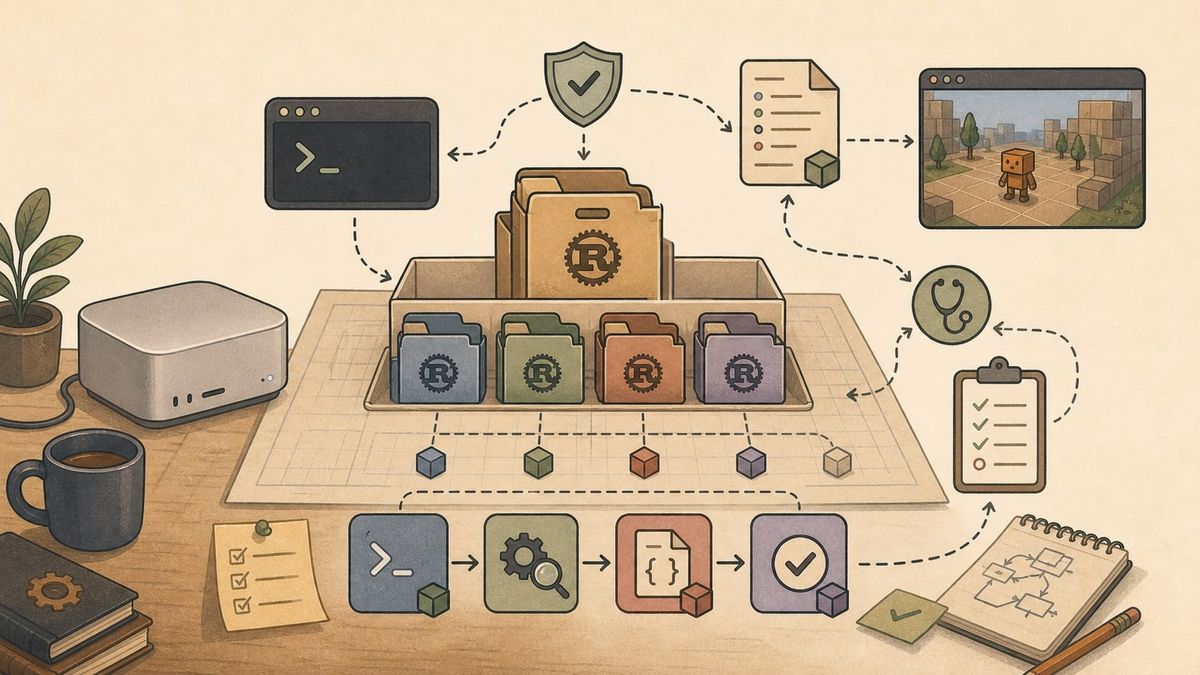
See Part 0 for the latest table of contents and sample code. New chapters will be added over time.
Chapter 2: Setting Up the Workspace
The first code chapter does not call a model. It does not parse a tool request. It does not know what an agent loop is yet.
That may feel slow, but it is the right place to start. Before an agent framework can do anything interesting, it needs a home. It needs a command people can run, a project layout that can grow, a few dependencies with clear reasons to exist, and a check script that says whether the current state is healthy. These are not exciting pieces, but they decide how the rest of the project will feel.
This post is also available on Medium. If you’re a paid Medium member and happen to read it there, it helps fund my next cup of coffee. Much appreciated ☕️😄
In this chapter, abcb becomes a Rust workspace with one crate, abcb-cli. That crate produces the command-line binary named abcb. The binary can print help, run a small doctor command, load a local abcb.toml if one exists, and pass the default check set: tests, formatting, and clippy. That is enough for a first checkpoint.
What is a crate?
In Rust, a crate is the basic compilation unit. A crate can produce a library, an executable binary, or sometimes both through different targets. In this chapter,abcb-cliis the package/crate that contains the source code, andabcbis the executable command produced from its binary target. Later,abcb-corewill be a library crate: code other crates can depend on, but not a command you run directly.
What is clippy?
Clippy is Rust's linter. It looks for common mistakes, suspicious patterns, unnecessary code, and places where the code could be written in a more idiomatic Rust style.
The sample code for this chapter is in sample-code/abcb/.
2.1 A Project, Not Just A Binary
The first decision is that abcb is a Cargo workspace, even though it only has one crate at the start.
File: abcb/Cargo.toml
[workspace]
members = ["crates/abcb-cli"]
resolver = "3"

[workspace.package]
edition = "2024"
license = "MIT"
repository = "https://github.com/dikoko/abcb"
rust-version = "1.95"

[workspace.dependencies]
clap = { version = "4.6.1", features = ["derive"] }
serde = { version = "1.0.228", features = ["derive"] }
toml = "1.1.2"
What is Cargo?
Cargo is Rust's build tool and package manager. It creates projects, readsCargo.toml, downloads dependencies, compiles crates, runs tests, formats code throughcargo fmt, and runs tools such as clippy. In practice, most Rust project work goes through Cargo rather than calling the compiler directly.
This is more structure than a tiny CLI strictly needs. A single Cargo.toml with a src/main.rs would be enough for a toy program. But abcb is not meant to stay a toy program. The future shape is already visible: a CLI crate, a core crate for conversation and loop logic, a model-provider crate, and a tools crate. We do not create all of them on day one, because empty abstractions are expensive. But we make room for them.
What is TOML?
TOML is a configuration file format. It is meant to be more explicit than YAML and easier to read than JSON for human-edited config files. Rust projects useCargo.tomlto describe packages, workspace membership, dependencies, binary targets, and shared metadata.
The workspace is the project boundary. It is the place where shared package metadata lives, where dependency versions are centralized, and where checks can run across every crate. Later, when abcb-core and abcb-tools appear, they will inherit the same edition, Rust version, and dependency versions. That keeps small version disagreements from spreading through the project.
The resolver = "3" line is part of that same decision. Cargo's resolver controls how dependency features are combined across the workspace. For example, two crates may depend on the same library but enable different optional features. The resolver decides how Cargo turns that into one build plan. Older Rust editions used older resolver behavior ("1" and later "2"). Because this project uses Rust 2024, resolver "3" is the matching modern choice. We do not need the details yet; the important point is that the workspace declares the dependency-resolution rules up front.
The first workspace member is crates/abcb-cli. The root Cargo.toml describes the workspace. Each crate also has its own Cargo.toml that describes that package's name, targets, and dependencies.
File: abcb/crates/abcb-cli/Cargo.toml
[package]
name = "abcb-cli"
version = "0.1.0"
edition.workspace = true
license.workspace = true
repository.workspace = true
rust-version.workspace = true

[[bin]]
name = "abcb"
path = "src/main.rs"

[dependencies]
clap = { workspace = true }
serde = { workspace = true }
toml = { workspace = true }
The package is named abcb-cli, but the binary is named abcb. That distinction matters. Crate names describe Rust packages. Binary names describe the command users type. In this project, the user-facing command should be short and direct. The crate name can be more explicit about its role inside the workspace.
The dependency list is also small on purpose. clap handles command-line parsing. serde provides serialization and deserialization support. toml parses abcb.toml. The workspace = true entries mean this crate uses the versions declared in the root workspace, rather than repeating version numbers in every crate.
2.2 The First Command Surface
The first real source file is small:
File: abcb/crates/abcb-cli/src/main.rs
use clap::{Parser, Subcommand};

#[derive(Debug, Parser)]
#[command(name = "abcb")]
#[command(version)]
#[command(about = "AI agent framework for Godot game development")]
struct Cli {
    #[command(subcommand)]
    command: Command,
}

#[derive(Debug, Subcommand)]
enum Command {
    /// Check the local abcb development environment.
    Doctor,
}
This is the first appearance of clap in the source code. The line use clap::{Parser, Subcommand}; brings two names from the clap crate into this file. If you come from another language, use is roughly similar to import: it makes names from another module or crate available in the current file. Those names are then used inside #[derive(Debug, Parser)] and #[derive(Debug, Subcommand)].
The syntax that starts with #[] is called an attribute in Rust. An attribute is metadata attached to the item, field, or expression that follows it. In this snippet, #[derive(Debug, Parser)] is attached to the next item, struct Cli. The #[command(subcommand)] attribute is attached to the next field, command: Command. It is not a normal statement, and it is not an expression. It does not run at that place in the program. It changes how the compiler and macros understand the code that follows.
The distinction matters because Rust uses expressions heavily. A statement performs an action but does not give a value back to the surrounding code. An expression evaluates to a value. For example, let cli = Cli::parse(); is a statement. Later, Ok(()) is an expression, and therefore the value returned from main.
The derive attribute is one of the most common examples. Debug asks Rust to generate ordinary debug-printing support. Parser and Subcommand come from clap, and they ask clap to generate command-line parsing code for these types. More precisely, these are derive macros. During macro expansion, before the final program is compiled, Rust expands them into additional Rust code. If you have the cargo-expand tool installed, you can inspect the expanded code, although we do not need to do that for this chapter.
This is useful because the source code stays small while the generated parser still handles a lot: parsing arguments, producing --help, producing --version, and reporting invalid commands. Without the macro, we would have to write much of that repetitive parsing code by hand.
The #[command(...)] attributes are also for clap. They configure the parser that clap generates from the derive macro. #[command(name = "abcb")] sets the command name. #[command(version)] tells it to use the package version. #[command(about = "...")] provides the text shown in help output. On the command field, #[command(subcommand)] tells clap that this field should be parsed as a subcommand.
The important thing is that the command-line surface is represented as Rust types. The program does not receive a raw string and inspect it manually. It receives a Command enum, and the compiler knows which command variants exist. Right now, that enum has only one variant: Doctor. Later it will grow chat, run, replay, and eval. The shape is already ready for that.
The main function is also deliberately plain:
File: abcb/crates/abcb-cli/src/main.rs
fn main() -> Result<(), Box<dyn Error>> {
    let cli = Cli::parse();

    match cli.command {
        Command::Doctor => run_doctor()?,
    }

    Ok(())
}
If you come from another programming language, the first line may be readable and strange at the same time. It is clearly the main function, but it returns Result<(), Box<dyn Error>>.
Result is a normal Rust type, and it is commonly used as the return type for operations that may fail. It has two cases: Ok(value) when the operation succeeds, and Err(error) when it fails. Here, the success value is (), pronounced "unit." It means there is no meaningful value to return. The program either finishes successfully with Ok(()), or it returns an error.
For now, Box<dyn Error> only needs to mean "some kind of error." The exact shape is not important yet. It lets this early command return different error types without forcing us to design the final application error model before the application exists.
The next line, let cli = Cli::parse();, asks clap to parse the actual command-line arguments into the Cli struct. After that, match cli.command chooses what to do based on the parsed command. match is close to switch in some other languages, but it works directly with Rust values. If the command is Command::Doctor, the program runs run_doctor().
The ? after run_doctor() is Rust's short way to handle errors. This is usually called the question mark operator. If run_doctor() returns Ok(...), execution continues. If it returns Err(...), main returns that error immediately. This keeps error handling visible without making every call site noisy.
The last line is Ok(()). There is no semicolon (;) at the end because this is the value returned by the function. When there is no explicit return, Rust uses the final expression of the function body as the return value. In this case, the final expression says: the command finished, and there is no extra value to give back.
This simple error type, Box<dyn Error>, will not be the answer everywhere. It is not a string. It is a boxed value that can hold different error types, as long as they implement Rust's Error trait. We will come back to Box, dyn, and more precise error types in later chapters. For now, this is convenient at the top level of the first CLI command. Inside the agent loop, errors will need more structure. A model provider failure is not the same as a config parse failure. A denied tool call is not the same as a file read failure. More precise errors can wait until the program has places that need to reason about them.
That is a recurring pattern in this series. Use the simple thing at the edge. Add precision where the program needs to reason.
2.3 doctor
The first command is doctor.
In many developer tools, a doctor command means "check my local environment and tell me what looks wrong." This version is much smaller than that. It does not inspect the Rust toolchain, the model server, or the Godot project yet. For now, it only proves two things: the command can run, and abcb can look for an optional local TOML config file named abcb.toml.
File: abcb/crates/abcb-cli/src/main.rs
fn run_doctor() -> Result<(), Box<dyn Error>> {
    println!("abcb doctor");
    println!("workspace: ok");

    match load_config(Path::new("abcb.toml"))? {
        Some(config) => {
            println!("config: found abcb.toml");
            if let Some(name) = config.project_name() {
                println!("project: {name}");
            }
        }
        None => println!("config: abcb.toml not found (ok for now)"),
    }

    Ok(())
}
The first two lines use println!, which prints a line to standard output. The exclamation mark is meaningful. In Rust, names ending in ! are usually macros, not normal functions. A macro can generate code at compile time, which is why println! can accept a flexible formatting pattern like println!("project: {name}").
Here are a few common macros that will appear in Rust projects:
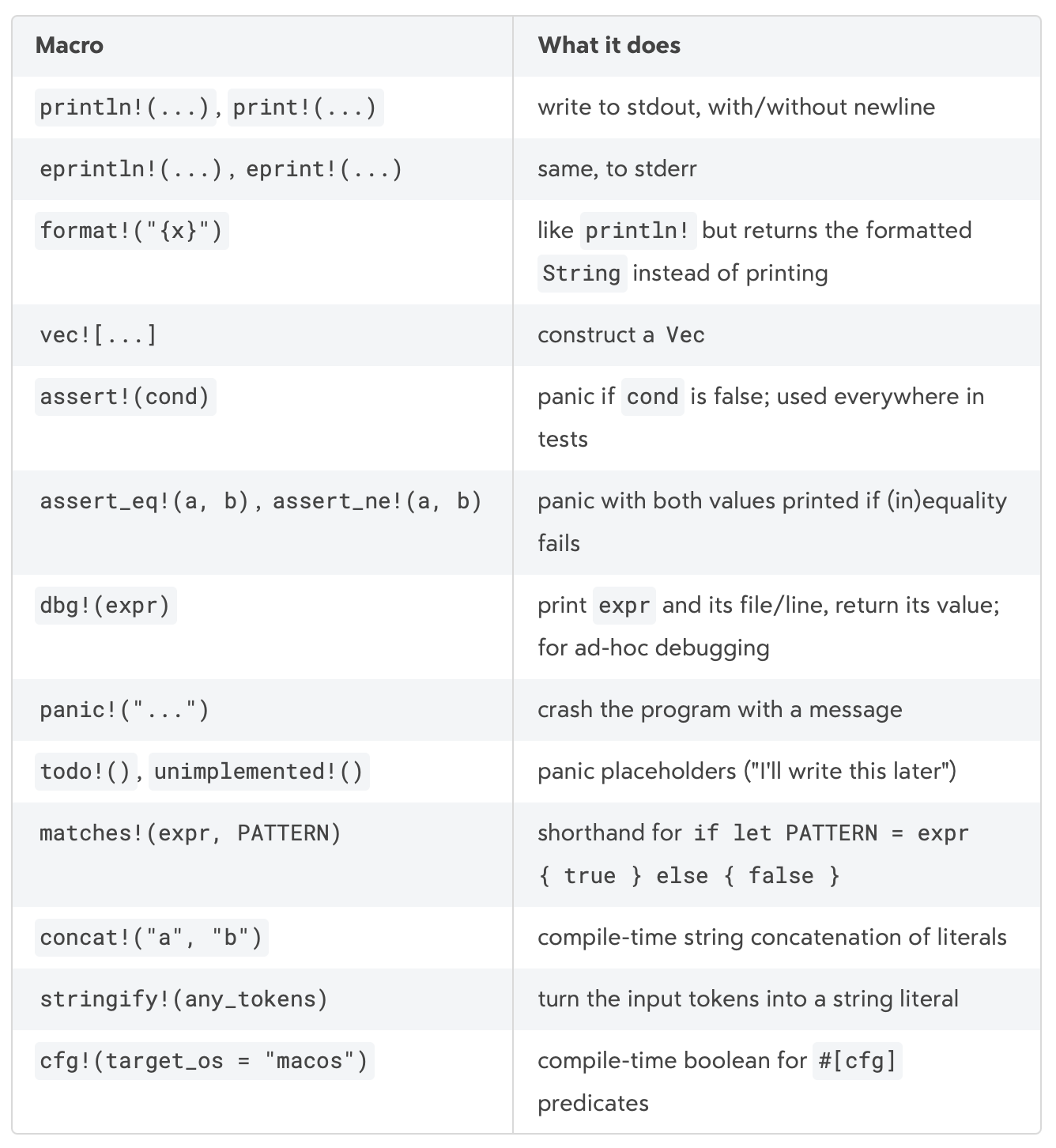
The match is doing the real work. load_config(Path::new("abcb.toml"))? tries to load the local config file. Because the file is optional, the result has two successful shapes: Some(config) when the file exists and was parsed, and None when it does not exist.
Some and None come from Rust's Option type. Option<T> is Rust's way to say "there may be a T, or there may be nothing." It is an enum with two variants: Some(T) and None. The important detail is that Rust enum variants can carry data. In Some(config), the variant carries the parsed config value with it.
Inside the Some(config) branch, there is another small pattern:
if let Some(n) = opt {   // Only run the body if it works.
    println!("{n}");
}
if let is a compact way to match one specific pattern and ignore the rest. In the real code, config.project_name() returns an Option<&str>. The &str part is a borrowed string slice, and we will come back to borrowed values in later chapters. For now, the important part is still Option: if it is Some(name), the body runs and prints the project name. If it is None, nothing happens.
The config type is intentionally tiny:
File: abcb/crates/abcb-cli/src/main.rs
#[derive(Debug, Deserialize, PartialEq, Eq)]
struct Config {
    project: Option<ProjectConfig>,
}

#[derive(Debug, Deserialize, PartialEq, Eq)]
struct ProjectConfig {
    name: Option<String>,
}
At this point, the config only knows about [project].name. That is enough to prove the path from file to TOML parser to typed Rust data. The actual model configuration will come later, when the project has a real provider to configure.
There is a small but important design decision here: the config type lives in abcb-cli, not in a shared library crate.
That may look unimportant now. It is not. Configuration is usually about how an application is wired on this machine: where the config file lives, which model endpoint to call, where local memory should be stored. Those are edge concerns. The core library should not need to know that a file named abcb.toml exists in the project root. When the core needs configuration, it should receive plain values after the CLI has loaded and interpreted them.
This is the first version of a principle that will come back many times: the CLI deals with files, paths, command-line arguments, and other machine-specific details. The core owns what the data means once it has been given.
That principle keeps the future library crates easier to test. A function that takes a string, a writer, or a typed value is easier to test than a function that insists on opening a particular path. It also keeps the project from creating shared crates too early. This is not a Rust-specific rule. It is ordinary software design: avoid premature abstraction. A crate split should be earned by real use, not predicted into existence.
2.4 Tests Before The Agent Exists
The tests in this chapter are small, but they set the expectation that code should be checkable from the beginning.
File: abcb/crates/abcb-cli/src/main.rs
#[cfg(test)]
mod tests {
    use super::*;

    #[test]
    fn command_name_is_abcb() {
        let command = Cli::command();

        assert_eq!(command.get_name(), "abcb");
    }

    #[test]
    fn parses_project_name_from_config() {
        let config = parse_config(
            r#"
            [project]
            name = "abcb"
            "#,
        )
        .expect("config should parse");

        assert_eq!(config.project_name(), Some("abcb"));
    }
}
The first test uses Cli::command(), which comes from clap::CommandFactory. It checks something simple: the generated command is actually named abcb. The second test parses a tiny TOML string and checks that project_name() returns the expected value.
The r#"..."# syntax is a raw string literal. In a normal Rust string, backslashes and quotes often need escaping. A raw string keeps the text closer to what you wrote. Here, that makes the inline TOML easier to read as TOML, not as a Rust string full of escape characters. The # marks are just delimiters. Rust also supports r"...", r##"..."##, and longer versions when the string itself contains quotes or # characters.
The .expect("config should parse") call unwraps a Result. If parsing succeeds, it gives the parsed config back. If parsing fails, the test panics with the message "config should parse". In production code, we should be careful with expect() because it can stop the program instead of handling the error. In this test, the TOML string is fixed inside the test itself, so a parse failure means the test setup or parser behavior is wrong. Failing loudly is exactly what we want.
The assert_eq! macro compares two values and fails the test if they are not equal. Here it checks that config.project_name() returns Some("abcb"). This test is small, but it verifies the whole path from a TOML string to a typed Rust value and then to a helper method.
This is also the first place where #[cfg(test)] appears. The test module only exists when tests are being compiled. The normal binary does not carry it. That is one of the quiet strengths of Rust's test model: unit tests can sit next to the private functions they exercise without becoming part of the runtime program.
2.5 The Check Set
The chapter ends with a script:
File: abcb/scripts/check.sh
#!/usr/bin/env bash
set -euo pipefail

cargo test --workspace
cargo fmt --check
cargo clippy --workspace -- -D warnings
This is the check set for the rest of the series.
The set -euo pipefail line is shell-script housekeeping. It tells the script to stop on errors, stop when an unset variable is used, and treat pipeline failures as failures. After that, the script runs the Rust checks.
cargo test --workspace says the tests pass across all crates. cargo fmt --check says the code is formatted according to Rust's standard style. cargo clippy --workspace -- -D warnings says clippy warnings are treated as failures.
That last part matters more than it may seem. In a learning project, clippy's feedback is useful. It also prevents small questionable habits from accumulating until they become the project's local style.
The script is intentionally boring. That is the point. Every later chapter can make the same promise: the sample code reaches a working checkpoint and passes the same check set.
2.6 What We Have So Far
At the end of this chapter, abcb is still not an agent. It is a project with a shape.
It has a Cargo workspace. It has one CLI crate. It has a user-facing command named abcb. It has a doctor command. It can parse a minimal local config file. It has unit tests. It has a check script. It has a place to grow.
For an agent framework, this may still look too small. But for the first checkpoint, it gives us the parts we need before the agent logic begins: a command surface, a project boundary, a config path, and a repeatable way to check the code.
The next chapter starts filling the project with the first real agent concept: a conversation. Before a model can answer, before a tool can run, and before a loop can continue, the framework needs to know what a message is, who said it, and which messages belong to a session.