Building a Local-First Agent Framework in Rust (Part 20): Real-World Tools

See Part 0 for the latest table of contents and sample code. New chapters will be added over time.
Chapter 20: Real-World Tools: Reading Files And Running Commands
For a long time, the tools in abcb were deliberately small.
echo proved that the loop could call a tool and feed the result back to the model. add_numbers gave us a simple typed argument shape. The session note tools made the result more practical, but they were still narrow. They were useful for exercising memory, event logs, approval, and evaluation, but they were not yet the tools I would naturally reach for when asking an agent about a project.
This chapter changes that.
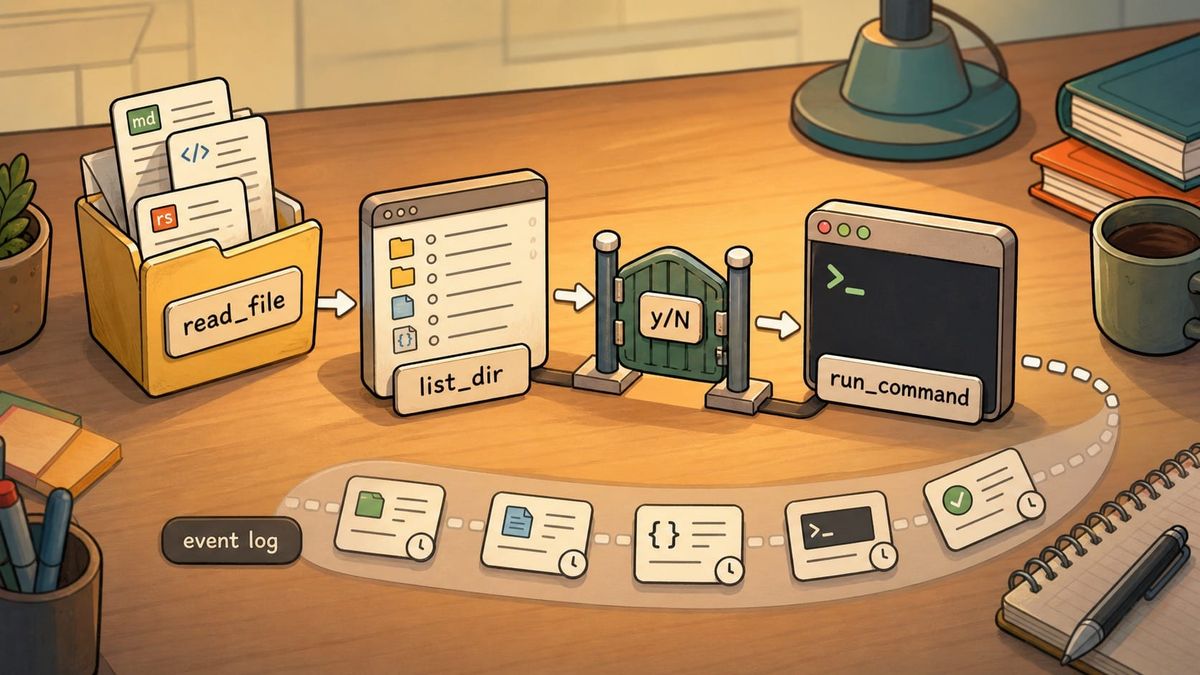
We add three tools:
read_file, which reads a text file inside the project.list_dir, which lists a directory inside the project.run_command, which runs a shell command in the project directory.
This post is also available on Medium. If you’re a paid Medium member and happen to read it there, it helps fund my next cup of coffee. Much appreciated ☕️😄
The first two make offline codebase Q&A possible. A local model can inspect the current project without sending the code to a cloud service. The third one makes the agent much more powerful, and therefore much more dangerous. A model that can read a file can answer questions. A model that can run a command can change the machine.
So Chapter 20 is not only about adding useful tools. It is about adding useful tools without pretending they are harmless.
The read-only tools go into the normal registry. run_command is different. It is registered only on the interactive run path, and it is gated by a new InteractivePolicy. Safe tools are auto-allowed. Anything else asks the user with a y/N prompt.
At this point, the pieces we have built start to feel like one working system. The loop can ask for a tool. The registry can find it. The policy can approve or deny it. The event log can record what happened. The run summary can report it afterward. If the user denies a command, the model gets that denial as feedback and can try another path.
The sample code for this chapter is in chapter20/abcb/.
20.1 The Default Registry Gets Read-Only Tools
The default registry is still the safe set of tools. This is important because more than one command uses it. run uses it as the base registry. eval uses it in an unattended path. Anything in this registry must be safe enough to run without a human prompt.
Chapter 20 adds ReadFile and ListDir to that set:
File: abcb/crates/abcb-cli/src/main.rs
fn default_registry(project_root: &Path, notes_path: PathBuf) -> ToolRegistry {
    let mut registry = ToolRegistry::new();
    registry.register(Echo).expect("echo is unique");
    registry
        .register(AddNumbers)
        .expect("add_numbers is unique");
    registry
        .register(ReadFile::new(project_root.to_path_buf()))
        .expect("read_file is unique");
    registry
        .register(ListDir::new(project_root.to_path_buf()))
        .expect("list_dir is unique");
    registry
        .register(SessionNoteAppend::new(notes_path.clone()))
        .expect("session_note_append is unique");
    registry
        .register(SessionNoteSearch::new(notes_path))
        .expect("session_note_search is unique");
    registry
}
The new part is not only the two registrations. It is the project_root argument.
ReadFile and ListDir are not free-floating filesystem tools. They are constructed with a root directory. Every path the model asks for is interpreted relative to that root, then checked again after resolution. The model can ask to read Cargo.toml. It should not be able to ask for /etc/passwd or escape through ../../.
That means the root is part of the tool's identity. The tool is not just "read any file." It is "read a file inside this project."
Because default_registry now needs that root, every call site changes. The run path passes its project_root, and the eval path passes the current directory too:
File: abcb/crates/abcb-cli/src/main.rs
let registry = default_registry(Path::new("."), notes);
That keeps eval on the safe registry, but its read-only tools are still confined to the project directory.
20.2 Path Checks Are Not String Checks
It is tempting to guard filesystem tools with string logic:
Does the requested path start with the project directory string?
That sounds reasonable until paths become real.
../ can move out of a directory. Symlinks can point outside a directory. On macOS, even familiar paths can hide aliases: /var is commonly a symlink to /private/var. If one side of a check is canonical and the other side is not, a comparison that looks safe can be wrong.
The filesystem tool module keeps that logic in one helper:
File: abcb/crates/abcb-tools/src/filesystem.rs
fn confine_to_root(root: &Path, requested: &str) -> Result<PathBuf, ToolError> {
    let resolved = root.join(requested).canonicalize()?;
    let canonical_root = root.canonicalize()?;
    if resolved.starts_with(&canonical_root) {
        Ok(resolved)
    } else {
        Err(ToolError::Execution(format!(
            "path `{requested}` is outside the project root"
        )))
    }
}
canonicalize is doing the serious work here. It asks the operating system for the real path. It resolves .. segments. It follows symlinks. It also requires the path to exist, which is fine for read_file and list_dir because both tools operate on existing files or directories.
There is a small Path::join trap hidden in this code. If requested is an absolute path, root.join(requested) does not keep the root in front. It discards the root and returns the absolute requested path. So /etc/passwd is not blocked by join. It is blocked by the later starts_with(&canonical_root) check, after both paths have been canonicalized.
The key detail is that both sides are canonicalized. Here, the root is the project root we passed into the tool. In this chapter that is usually Path::new("."), meaning the current project directory:
let resolved = root.join(requested).canonicalize()?;
let canonical_root = root.canonicalize()?;
If the project lives at /Users/me/abcb, then canonical_root is the real filesystem path for /Users/me/abcb. If we canonicalized only the requested path and compared it to the original root string, we could get false mismatches or false confidence. A resolved /private/var/... path and an unresolved /var/... root may refer to the same place but not start with the same bytes. The safe comparison is between the real requested path and the real project root.
Only after that does starts_with become meaningful:
if resolved.starts_with(&canonical_root) {
    Ok(resolved)
} else {
    Err(ToolError::Execution(format!(
        "path `{requested}` is outside the project root"
    )))
}
Notice the error type. The ? on canonicalize()? means a missing file becomes an I/O error before the policy check:
let resolved = root.join(requested).canonicalize()?;
A path that exists but resolves outside the root becomes ToolError::Execution. That means the tool ran, understood the request, and rejected it as a policy violation. The loop can feed that back to the model as recoverable tool feedback. The model may then try a path inside the project.
Here are the cases in plain terms:
Cargo.tomlinside/Users/me/abcbresolves under the canonical project root, so it is allowed.../../etc/passwdmay exist, but if the project root is/Users/me/abcb, that requested path resolves outside/Users/me/abcb, so it is rejected asToolError::Execution./etc/passwdis absolute, soroot.join("/etc/passwd")becomes/etc/passwd; the later prefix check rejects it as outside the root.missing.txtcannot be canonicalized, so the?returns an I/O error beforestarts_withis checked.
If someone deliberately constructed the tool with /etc as its root, then /etc/passwd would be inside that configured root. That is not a bug in confine_to_root; it means the caller chose a different boundary. In abcb, we choose the project directory as that boundary.
20.3 Reading A File
Once path confinement is factored out, read_file is small:
File: abcb/crates/abcb-tools/src/filesystem.rs
#[derive(Deserialize)]
struct ReadFileArgs {
    path: String,
}
File: abcb/crates/abcb-tools/src/filesystem.rs
pub struct ReadFile {
    root: PathBuf,
}

impl ReadFile {
    pub fn new(root: PathBuf) -> Self {
        Self { root }
    }
}
The tool owns a PathBuf, not a borrowed &Path. That is the same constructor pattern we have used before: the registry owns the tool, and the tool owns the configuration it needs. We do not want the registry entry to depend on some borrowed path living elsewhere.
The invocation follows the now-familiar tool shape:
File: abcb/crates/abcb-tools/src/filesystem.rs
impl Tool for ReadFile {
    fn name(&self) -> &str {
        "read_file"
    }

    fn description(&self) -> &str {
        "Reads the UTF-8 text file at `path` (relative to the project root) and returns its contents."
    }

    fn invoke(&self, args: &serde_json::Value) -> Result<String, ToolError> {
        let typed: ReadFileArgs = serde_json::from_value(args.clone())?;
        let path = confine_to_root(&self.root, &typed.path)?;
        Ok(fs::read_to_string(path)?)
    }
}
There are three steps:
- Convert the JSON arguments into a typed Rust struct.
- Confine the requested path to the project root.
- Read the file as UTF-8 text.
This tool is useful immediately. It lets the agent answer questions like "what dependencies does this crate use?" or "what does the CLI command enum look like?" In this book's setup, the provider talks to a local OpenAI-compatible model server. So when read_file feeds file contents back into the conversation, those contents go to the local model process, not to a cloud model API. That is the practical meaning of offline codebase Q&A here.
It also has a real limitation: there is no size cap.
If the model asks for a huge file, read_file will read it and send the whole content back through the loop. That can blow the context window of a local model, make the run slow, or make the next model response worse. For this chapter, I leave that limitation visible. A production tool should probably enforce a maximum byte count, return a truncation message, or provide a separate preview/search tool.
20.4 Listing A Directory
list_dir uses the same confinement helper, but returns names instead of file contents:
File: abcb/crates/abcb-tools/src/filesystem.rs
#[derive(Deserialize)]
struct ListDirArgs {
    path: String,
}
File: abcb/crates/abcb-tools/src/filesystem.rs
pub struct ListDir {
    root: PathBuf,
}

impl ListDir {
    pub fn new(root: PathBuf) -> Self {
        Self { root }
    }
}
The invocation has one small but important detail:
File: abcb/crates/abcb-tools/src/filesystem.rs
impl Tool for ListDir {
    fn name(&self) -> &str {
        "list_dir"
    }

    fn description(&self) -> &str {
        "Lists the entries of the directory at `path` (relative to the project root), one per line, sorted."
    }

    fn invoke(&self, args: &serde_json::Value) -> Result<String, ToolError> {
        let typed: ListDirArgs = serde_json::from_value(args.clone())?;
        let dir = confine_to_root(&self.root, &typed.path)?;

        let mut names = Vec::new();
        for entry in fs::read_dir(dir)? {
            names.push(entry?.file_name().to_string_lossy().into_owned());
        }
        names.sort();
        Ok(names.join("\n"))
    }
}
fs::read_dir does not promise a stable order. The operating system decides the order. That is fine for a human browsing a folder, but it is annoying for tests and for model feedback. If the same directory returns a different order on another machine, the next prompt may change for no meaningful reason.
So the tool sorts the names.
This is a small example of a pattern that matters a lot in agent work. When the world gives us nondeterminism we do not need, we should remove it before it reaches the model. We cannot make the model deterministic, but we can avoid adding unnecessary noise around it.
The to_string_lossy() call is also worth noticing. File names on Unix are not guaranteed to be valid UTF-8. The tool returns text, so it needs some way to represent names that are not clean UTF-8. to_string_lossy() replaces invalid bytes with the Unicode replacement character. That is not perfect, but it keeps the tool from failing just because one filename is unusual.
20.5 Running A Command
Reading files is useful. Running commands is another category.
Here is the tool:
File: abcb/crates/abcb-tools/src/run_command.rs
#[derive(Deserialize)]
struct RunCommandArgs {
    command: String,
}
File: abcb/crates/abcb-tools/src/run_command.rs
pub struct RunCommand {
    working_dir: PathBuf,
}

impl RunCommand {
    pub fn new(working_dir: PathBuf) -> Self {
        Self { working_dir }
    }
}
The tool owns its working directory for the same reason the filesystem tools own their root. Once the tool is registered, it should have everything it needs to run.
The implementation uses the standard library's Command type:
File: abcb/crates/abcb-tools/src/run_command.rs
impl Tool for RunCommand {
    fn name(&self) -> &str {
        "run_command"
    }

    fn description(&self) -> &str {
        "Runs a shell command in the project directory and returns its combined stdout and stderr."
    }

    fn invoke(&self, args: &serde_json::Value) -> Result<String, ToolError> {
        let typed: RunCommandArgs = serde_json::from_value(args.clone())?;

        let output = Command::new("sh")
            .arg("-c")
            .arg(&typed.command)
            .current_dir(&self.working_dir)
            .output()?;

        let mut combined = String::from_utf8_lossy(&output.stdout).into_owned();
        combined.push_str(&String::from_utf8_lossy(&output.stderr));

        if !output.status.success() {
            let status = output.status.code().map_or_else(
                || "terminated by signal".to_string(),
                |c| format!("exit code {c}"),
            );
            combined.push_str(&format!("\n[command failed: {status}]"));
        }

        Ok(combined)
    }
}
Command::new("sh").arg("-c").arg(&typed.command) means we are intentionally running a shell string. We could have designed this as an argv array, such as {"program":"cargo","args":["test"]}. That would avoid some shell quoting and injection issues. But it would also be less natural for the model and less natural for the human approving the command.
In this chapter, the human is the gate. The model proposes a command string. The user sees that exact string before it runs. The goal is not to make run_command safe for unattended execution. The goal is to make it useful in an interactive loop where a human can say no.
The command runs in the project directory:
.current_dir(&self.working_dir)
That makes relative commands behave the way a user would expect. If the model asks to run cargo test, it runs where the project lives. If it asks to run cat Cargo.toml, the path is relative to the project directory.
There is another deliberate choice here: a non-zero exit status is not a ToolError.
The command ran. It may have failed, but the tool itself succeeded in launching it and collecting the output. So the tool returns Ok(combined) and appends a status line:
combined.push_str(&format!("\n[command failed: {status}]"));
That gives the model information it can act on. A failing test command is not the same as a broken tool. A command that exits with code 3 can still be useful feedback.
20.5.1 String::from_utf8_lossy
Command::output() returns an Output:
let output = Command::new("sh")
    .arg("-c")
    .arg(&typed.command)
    .current_dir(&self.working_dir)
    .output()?;
The Output contains three main pieces:
stdout, as bytes.stderr, as bytes.status, as an exit status.
They are bytes because processes do not have to print valid UTF-8. But our tool interface returns Result<String, ToolError>, so run_command has to turn those bytes into text.
That is what String::from_utf8_lossy does:
File: abcb/crates/abcb-tools/src/run_command.rs
let mut combined = String::from_utf8_lossy(&output.stdout).into_owned();
combined.push_str(&String::from_utf8_lossy(&output.stderr));
The "lossy" part means invalid UTF-8 bytes are replaced instead of causing an error. That is the right tradeoff for this tool. If a command prints mostly useful text with a few invalid bytes, I would rather show the model the readable part than fail the whole tool call.
The first call ends with .into_owned() because from_utf8_lossy returns a Cow<str>, which means "clone on write." If the bytes are already valid UTF-8, it can borrow the existing data. If not, it allocates a new string with replacement characters. We want a mutable String so we can append stderr and maybe append the failure status, so we call .into_owned().
The second call is passed directly to push_str. push_str only needs a borrowed string slice for the duration of the call, so we do not need to allocate a second owned String just to append it.
20.6 run_command Is Not In The Default Registry
The safest way to handle a dangerous tool is to make it impossible to reach from unattended paths.
That is why default_registry does not include run_command. The test says it directly:
File: abcb/crates/abcb-cli/src/main.rs
#[test]
fn default_registry_has_the_safe_tools_but_not_run_command() {
    let registry = default_registry(Path::new("."), PathBuf::from(".abcb/notes.txt"));

    let mut names: Vec<&str> = registry.names().collect();
    names.sort();

    assert_eq!(
        names,
        vec![
            "add_numbers",
            "echo",
            "list_dir",
            "read_file",
            "session_note_append",
            "session_note_search"
        ]
    );
}
The actual registration happens only inside run_run:
File: abcb/crates/abcb-cli/src/main.rs
async fn run_run(message: String, mock: bool) -> Result<(), Box<dyn Error>> {
    let project_root = PathBuf::from(".");
    let mut registry = default_registry(&project_root, PathBuf::from(NOTES_PATH));
    registry
        .register(RunCommand::new(project_root))
        .expect("run_command is unique");

    // ...
}
This is safety by construction.
One ownership detail is easy to miss. default_registry(&project_root, ...) borrows project_root, and RunCommand::new(project_root) moves it. That is allowed because the borrow ends when default_registry returns. After that call, the owned PathBuf is free to move into RunCommand.
eval uses default_registry, and default_registry has no run_command. Even if the model emits a perfect run_command tool call during abcb eval, the tool is not there. The unattended eval path cannot shell out because there is no registered shell tool to call.
This is stronger than saying "eval uses AllowAll, but please trust that it will not call dangerous tools." The dangerous tool is absent from the registry.
20.7 Interactive Approval
Chapter 16 introduced ApprovalPolicy, but until now the production path still used simple policies like AllowAll. Chapter 20 adds a real CLI policy:
File: abcb/crates/abcb-cli/src/main.rs
struct InteractivePolicy {
    auto_allow: HashSet<String>,
}
The policy contains an allow-list:
File: abcb/crates/abcb-cli/src/main.rs
impl InteractivePolicy {
    fn new() -> Self {
        let auto_allow = [
            "echo",
            "add_numbers",
            "read_file",
            "list_dir",
            "session_note_append",
            "session_note_search",
        ]
        .into_iter()
        .map(String::from)
        .collect();
        Self { auto_allow }
    }
}
HashSet<String> is the right small tool here. We are asking one question over and over:
Is this tool name in the auto-allowed set?
A Vec<String> could answer that too, but it would scan linearly. A HashSet represents the intention more directly: membership matters, order does not.
The construction chain is also a compact Rust pattern:
[
    "echo",
    "add_numbers",
    "read_file",
    "list_dir",
    "session_note_append",
    "session_note_search",
]
.into_iter()
.map(String::from)
.collect()
The array starts as &str literals. .into_iter() walks over them. .map(String::from) converts each &str into an owned String. The last step, .collect(), needs to know what collection type to build.
That target type is visible in the field:
struct InteractivePolicy {
    auto_allow: HashSet<String>,
}
Rust can infer that collect() should produce a HashSet<String> because the value is assigned to auto_allow, and auto_allow is later used to initialize that field:
Self { auto_allow }
We could also make the type explicit inside new:
let auto_allow: HashSet<String> = [
    "echo",
    "add_numbers",
    "read_file",
    "list_dir",
    "session_note_append",
    "session_note_search",
]
.into_iter()
.map(String::from)
.collect();
The sample code lets inference do that work, but the meaning is the same: take this fixed list of names and collect it into a set.
20.7.1 Prompt By Default
The approval implementation has two paths:
File: abcb/crates/abcb-cli/src/main.rs
impl ApprovalPolicy for InteractivePolicy {
    fn approve(&mut self, tool_name: &str, arguments: &serde_json::Value) -> ApprovalDecision {
        if self.auto_allow.contains(tool_name) {
            return ApprovalDecision::Allow;
        }

        eprint!("\nagent wants to run `{tool_name}` with {arguments}\nallow? [y/N] ");
        let _ = io::stderr().flush();

        let mut answer = String::new();
        if io::stdin().read_line(&mut answer).is_err() {
            return ApprovalDecision::Deny;
        }
        decide_from_answer(&answer)
    }
}
If the tool is in the allow-list, the policy returns immediately. It does not read from stdin. It does not prompt. That is why the test can check safe tools without blocking:
File: abcb/crates/abcb-cli/src/main.rs
#[test]
fn interactive_policy_auto_allows_safe_tools_without_prompting() {
    let mut policy = InteractivePolicy::new();

    for tool in ["read_file", "list_dir", "echo", "session_note_search"] {
        assert_eq!(
            policy.approve(tool, &serde_json::json!({})),
            ApprovalDecision::Allow,
            "{tool} should be auto-allowed"
        );
    }
}
If the tool is not in the allow-list, the policy asks the user.
The default is important. This is an allow-list, not a deny-list. If we add a new tool later and forget to classify it, the policy prompts. It does not silently allow the new tool because it forgot to deny it.
That is the shape I want for agent tools. Unknown capability should fail toward human attention.
The prompt prints to stderr:
eprint!("\nagent wants to run `{tool_name}` with {arguments}\nallow? [y/N] ");
This follows the stdout/stderr contract from Chapter 17. Stdout is reserved for the final answer. Operational chatter, prompts, and summaries go to stderr.
20.7.2 Pure Decision, Impure Input
The stdin part of InteractivePolicy is hard to unit test directly. It reads from the process. It waits for user input. That is not the kind of behavior we want in a normal unit test.
So the code splits the decision:
File: abcb/crates/abcb-cli/src/main.rs
fn decide_from_answer(answer: &str) -> ApprovalDecision {
    match answer.trim().to_ascii_lowercase().as_str() {
        "y" | "yes" => ApprovalDecision::Allow,
        _ => ApprovalDecision::Deny,
    }
}
The impure part reads a line. The pure part interprets the line.
That gives us a small function with complete tests:
File: abcb/crates/abcb-cli/src/main.rs
#[test]
fn decide_from_answer_allows_only_explicit_yes() {
    for yes in ["y", "Y", "yes", "YES", " y \n"] {
        assert_eq!(decide_from_answer(yes), ApprovalDecision::Allow, "{yes:?}");
    }
    for no in ["n", "no", "", "  ", "maybe", "sure"] {
        assert_eq!(decide_from_answer(no), ApprovalDecision::Deny, "{no:?}");
    }
}
The rule is intentionally strict. Only y and yes, in any case, approve. Empty input, EOF, "maybe," and anything ambiguous deny.
This is the pure/IO split again. We cannot remove I/O from an interactive approval policy, but we can keep the policy's judgment in a pure function. The part most likely to have edge cases is the part we can test thoroughly.
20.8 Denial Is Part Of The Loop
When run_command is denied, the loop does not crash. That behavior came from Chapter 16, but this chapter is where it becomes visible in a real workflow.
The core loop asks the policy before executing a tool:
File: abcb/crates/abcb-core/src/lib.rs
let tool = registry
    .get(&tool_name)
    .ok_or_else(|| LoopError::UnknownTool(tool_name.clone()))?;

if policy.approve(&tool_name, &arguments) == ApprovalDecision::Deny {
    write_event(
        events,
        &Event::ToolDenied {
            tool_name: tool_name.clone(),
        },
    )?;
    session.push_message(Message::new(
        Role::Tool,
        format!("the tool `{tool_name}` was denied by the approval policy"),
    ));
    return Ok(StepOutcome::ToolDenied { tool_name });
}
The lookup happens before approval. That ordering is reasonable: if the tool does not exist, there is no real tool action to approve or deny. Unknown tool is a model error. Denied tool is a policy decision about a known tool.
On denial, the event log gets ToolDenied, and the model gets a Role::Tool message explaining that the action was denied. That means the model can adapt. If it asked to remove files and the user said no, it can offer a safer next step, such as listing the files or explaining what it would have done.
This is why the event log and recovery path matter here. The world does not only return successful tool results. It can also say no, and the loop should make that refusal visible to both the model and the user.
20.9 The Leaky Public Trait
Chapter 16 defined ApprovalPolicy in abcb-core:
File: abcb/crates/abcb-core/src/lib.rs
pub trait ApprovalPolicy {
    fn approve(&mut self, tool_name: &str, arguments: &serde_json::Value) -> ApprovalDecision;
}
At the time, that looked harmless. The loop already used serde_json::Value for tool arguments. Passing the same value to the policy was convenient.
Chapter 20 shows the cost. InteractivePolicy lives in abcb-cli, outside abcb-core. To implement the trait, abcb-cli must name the exact argument type:
File: abcb/crates/abcb-cli/src/main.rs
impl ApprovalPolicy for InteractivePolicy {
    fn approve(&mut self, tool_name: &str, arguments: &serde_json::Value) -> ApprovalDecision {
        // ...
    }
}
That means abcb-cli needs serde_json as a direct dependency:
File: abcb/crates/abcb-cli/Cargo.toml
[dependencies]
abcb-core = { path = "../abcb-core" }
abcb-models = { path = "../abcb-models" }
abcb-tools = { path = "../abcb-tools" }
clap = { workspace = true }
serde = { workspace = true }
serde_json = { workspace = true }
tokio = { workspace = true }
toml = { workspace = true }
This is not a disaster. abcb-cli already lives close to JSON because it wires model output, tool arguments, and tests. But it is a useful architecture lesson.
A public trait leaks every type in its method signatures.
If a trait says &serde_json::Value, then every external implementor has to know about serde_json::Value. If we introduced our own ToolRequest type and used &ToolRequest instead, then the defining crate could control the public vocabulary. If a trait says &str for a pre-rendered argument display, then the policy becomes simpler but loses structured access.
For now, I keep the leak. The policy genuinely wants to show the arguments to the user:
eprint!("\nagent wants to run `{tool_name}` with {arguments}\nallow? [y/N] ");
But this is a place to remember. Public traits feel small when the first implementor is in the same crate. They reveal their real shape when another crate implements them.
20.10 The Interactive Run Path
With the registry and policy in place, the real run path changes in one focused way.
The mock path still uses AllowAll. It is deterministic and does not need user input. The real provider path uses InteractivePolicy:
File: abcb/crates/abcb-cli/src/main.rs
let outcome = run_loop(
&mut provider,
®istry,
&mut session,
config.max_steps(),
&mut events,
&mut InteractivePolicy::new(),
)
.await;
This line has a small temporary-borrow pattern we have seen before. InteractivePolicy::new() creates a value, and &mut borrows it for the duration of the run_loop call. Because the policy is needed only for this one call, it does not need a separate local variable.
The full path now has an interesting shape:
- Build the safe registry.
- Add
run_commandonly forrun. - Start a session.
- Write events to
events.jsonl. - Drive the loop with an interactive approval policy.
- Read the event log back and print a summary.
- Print the final answer to stdout.
That is the agent framework we have been assembling piece by piece. It is still small, but it is no longer only a demonstration.
20.11 What We Still Do Not Have
Two missing pieces are worth naming clearly.
First, run_command has no timeout.
If the model asks to run sleep 1000 and the user approves it, the loop waits. The current implementation uses Command::output(), which runs the child process and waits until it exits. That is simple and good enough for this chapter, but it is not enough for a robust agent. A future version should run commands with a timeout, probably by moving to async process handling or a separate blocking thread with cancellation policy.
Second, read_file has no size cap.
A local-first agent should be especially careful about context. Local models often have smaller context windows than large commercial models, and they can be more sensitive to noisy tool output. A 200-line file may be useful. A generated lockfile or a huge log file may poison the run.
These are not theoretical concerns. They are exactly the kinds of edges that appear when a tool stops being a toy.
I am leaving both limits visible because they are part of the honest shape of this checkpoint. Chapter 20 is not "we made a safe shell agent." It is "we gave the agent real tools, put the dangerous one behind a human gate, and exposed the next safety work clearly."
20.12 What Changed
abcb can now inspect a project through read_file and list_dir. Those tools are confined to a project root with canonical path checks, then auto-allowed by the interactive policy because they are read-only.
abcb can also propose shell commands through run_command, but only in the interactive run command. The unattended eval path does not register it. On the real run path, unknown tools still fail through the loop, safe tools pass immediately, and dangerous tools ask the user before they execute.
On the Rust side, this chapter used canonicalize, PathBuf, Command, Output, String::from_utf8_lossy, HashSet, and the pure/IO split around decide_from_answer. It also surfaced a more architectural Rust lesson: a public trait signature is part of the API surface, including any third-party types it names.
The framework is still small. But now it can do something recognizably useful: answer questions about local files and, with permission, run commands in the project.
This is also a good place to stop the main build. The CLI agent can talk to a local model, keep a session, use tools, record what happened, ask for approval, and measure some of its own behavior. The next chapter will be the last one. It looks past this checkpoint: what would change if abcb stopped being only a CLI tool and became something embedded inside a larger creative environment?