Testing Gemma 4 Beyond Chat: A Small Detour into Agent Loops


In the previous post, I set up Gemma 4 locally with MLX and connected it to my usual local-model workflow. That post was mostly about the environment itself: getting the model running, exposing it through an OpenAI-compatible endpoint, and making it usable from tools like Open WebUI. Once that was working, the next question was less about installation and more about behavior. I did not want to run a benchmark or make a broad claim about Gemma 4’s capability. I just wanted to use it in the most ordinary way possible and see whether it could handle some of the basic behaviors that matter for agent-style workflows.
This post is also available on Medium. If you’re a paid Medium member and happen to read it there, it helps fund my next cup of coffee. Much appreciated ☕️😄
The experiment started inside Open WebUI. I asked Gemma 4 some normal questions, then asked it to make plans for small tasks. The results were better than I expected in a practical sense. It could break a task into steps, follow a system instruction reasonably well, and produce plans that looked usable as intermediate output. This was not systematic evaluation, but that was not the goal. I was trying to get a rough feeling for whether the model could participate in the kind of workflow I care about: planning, structured responses, and eventually tool use.
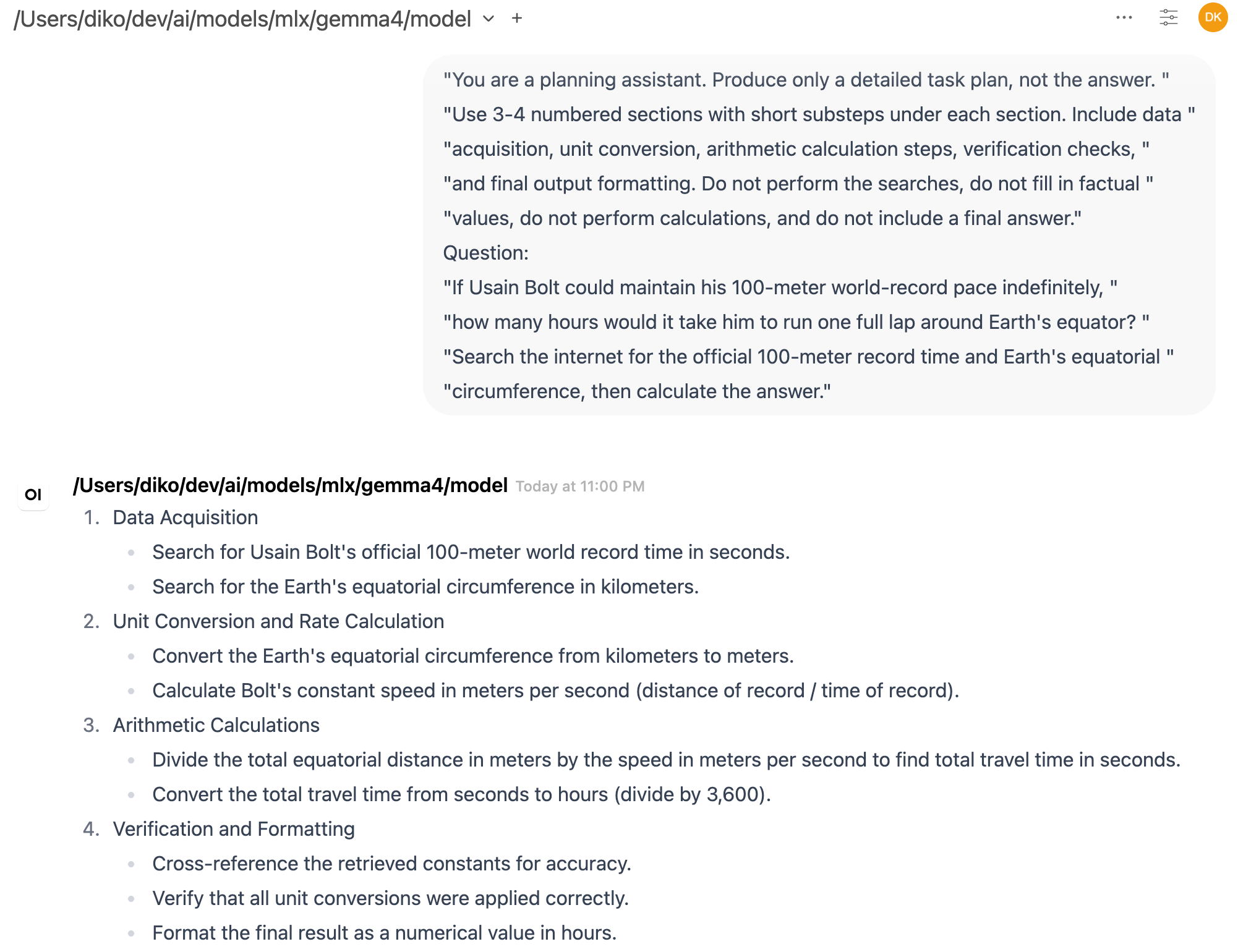
Then I tried asking it to convert a plan into structured output. This is one of those small capabilities that becomes important very quickly when building agents. A chat answer can be loose and still useful to a human, but an agent framework often needs output that can be parsed, checked, routed, or used to decide the next action. However, in Open WebUI, the structured response looked like it was cut off in the middle. That immediately raised the annoying but familiar local-LLM question: which layer is actually failing?
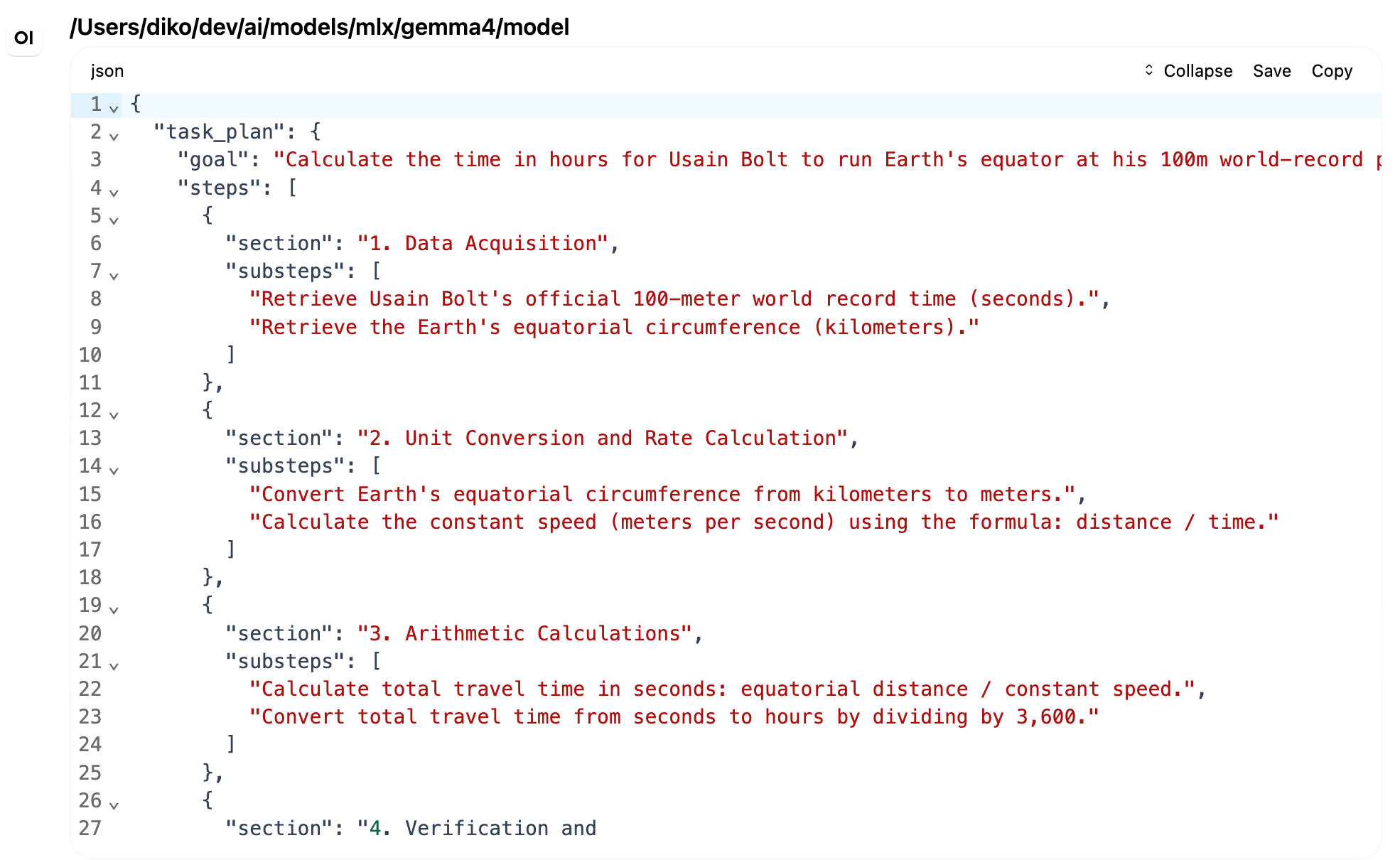
It could have been the model. It could have been the MLX server. It could have been the OpenAI-compatible API wrapper. It could have been Open WebUI’s rendering, streaming, output-token settings, or session handling. Local LLM setups are powerful, but they also introduce more surfaces where something can go wrong. When using a hosted API, many of these layers are hidden. When running locally, they become visible, which is good for learning but less good for guessing.
So I wrote a small Python script to call the model directly. The script uses the normal OpenAI Python SDK, but instead of sending requests to OpenAI, it points to my local endpoint. In my setup, that endpoint was running on port 8083, and the model value needed to be the full local path to the MLX model directory. That was one of the small lessons from the setup: the server was already running the model, but the chat completion request still needed to identify it in the way the server expected. In this server, a short name like gemma4 was not treated as an alias for the loaded model. It was interpreted as something the server should resolve or load. Using the full local model path from the health response made the request work.
# /// script
# requires-python = ">=3.11"
# dependencies = [
#   "openai",
# ]
# ///

from openai import APIConnectionError, APIStatusError, OpenAI
from openai.types.chat import ChatCompletionMessageParam

BASE_URL = "http://localhost:8083/v1"
MODEL = "/Users/diko/dev/ai/models/mlx/gemma4/model"
MAX_TOKENS = 2000
REQUEST_TIMEOUT = 120.0
API_KEY = "local-key"


def print_response(label, response):
    choice = response.choices[0]
    content = choice.message.content or ""

    print(f"\n--- {label} ---")
    print(f"finish_reason: {choice.finish_reason}")
    print(f"characters: {len(content)}")
    print()
    print(content)


def main():
    client = OpenAI(
        base_url=BASE_URL,
        api_key=API_KEY,
        timeout=REQUEST_TIMEOUT,
    )

    messages: list[ChatCompletionMessageParam] = [
        {
            "role": "system",
            "content": (
                "You are a planning assistant. Produce only a detailed task plan, not the answer. "
                "Use 3-4 numbered sections with short substeps under each section. Include data "
                "acquisition, unit conversion, arithmetic calculation steps, verification checks, "
                "and final output formatting. Do not perform the searches, do not fill in factual "
                "values, do not perform calculations, and do not include a final answer."
            ),
        },
        {
            "role": "user",
            "content": (
                "If Usain Bolt could maintain his 100-meter world-record pace indefinitely, "
                "how many hours would it take him to run one full lap around Earth's equator? "
                "Search the internet for the official 100-meter record time and Earth's equatorial "
                "circumference, then calculate the answer."
            ),
        },
    ]

    plan_response = client.chat.completions.create(
        model=MODEL,
        messages=messages,
        max_tokens=MAX_TOKENS,
        temperature=0.2,
    )
    print_response("Initial plan", plan_response)

    plan_content = plan_response.choices[0].message.content or ""
    follow_up_messages: list[ChatCompletionMessageParam] = [
        {
            "role": "assistant",
            "content": plan_content,
        },
        {
            "role": "user",
            "content": "Could you make this plan into a structured output?",
        },
    ]
    messages.extend(follow_up_messages)

    structured_response = client.chat.completions.create(
        model=MODEL,
        messages=messages,
        max_tokens=MAX_TOKENS,
        temperature=0.2,
    )
    print_response("Structured follow-up", structured_response)


if __name__ == "__main__":
    try:
        main()
    except APIConnectionError:
        print(f"Could not connect to {BASE_URL}. Is your local model server running?")
    except APIStatusError as e:
        print(f"Local model server returned {e.status_code}: {e.response.text}")
For someone else running the same sample, the process is simple. First, start the local Gemma 4 OpenAI-compatible server and confirm the health endpoint works. Then update the constants near the top of the script, especially the model path, to match the local machine. The model path can usually be copied from the loaded model field in the health response. After that, the script can be run with uv (uv run gemma4_test.py). The sample includes inline uv dependency metadata, so uv can create an isolated environment and install the OpenAI Python SDK automatically. If someone prefers a persistent project environment, they can initialize one with uv and add the OpenAI dependency there instead.The script performs a simple two-turn conversation. First, it sends a system prompt telling the model to behave as a planning assistant. The prompt is deliberately strict: produce only a detailed task plan, do not answer the user’s question, do not perform searches, do not fill in factual values, and do not calculate the final result. The user question asks how many hours it would take Usain Bolt to run one full lap around Earth’s equator if he could maintain his 100-meter world-record pace indefinitely. This is a useful test prompt because it has several parts: looking up values, converting units, doing arithmetic, checking the result, and formatting the final answer.
Gemma 4 produced a reasonable plan. It separated the task into data acquisition, unit conversion, arithmetic calculation, and verification or final formatting. After that first response, the script appended the assistant’s plan to the message history and sent a follow-up message asking the model to turn the plan into structured output.
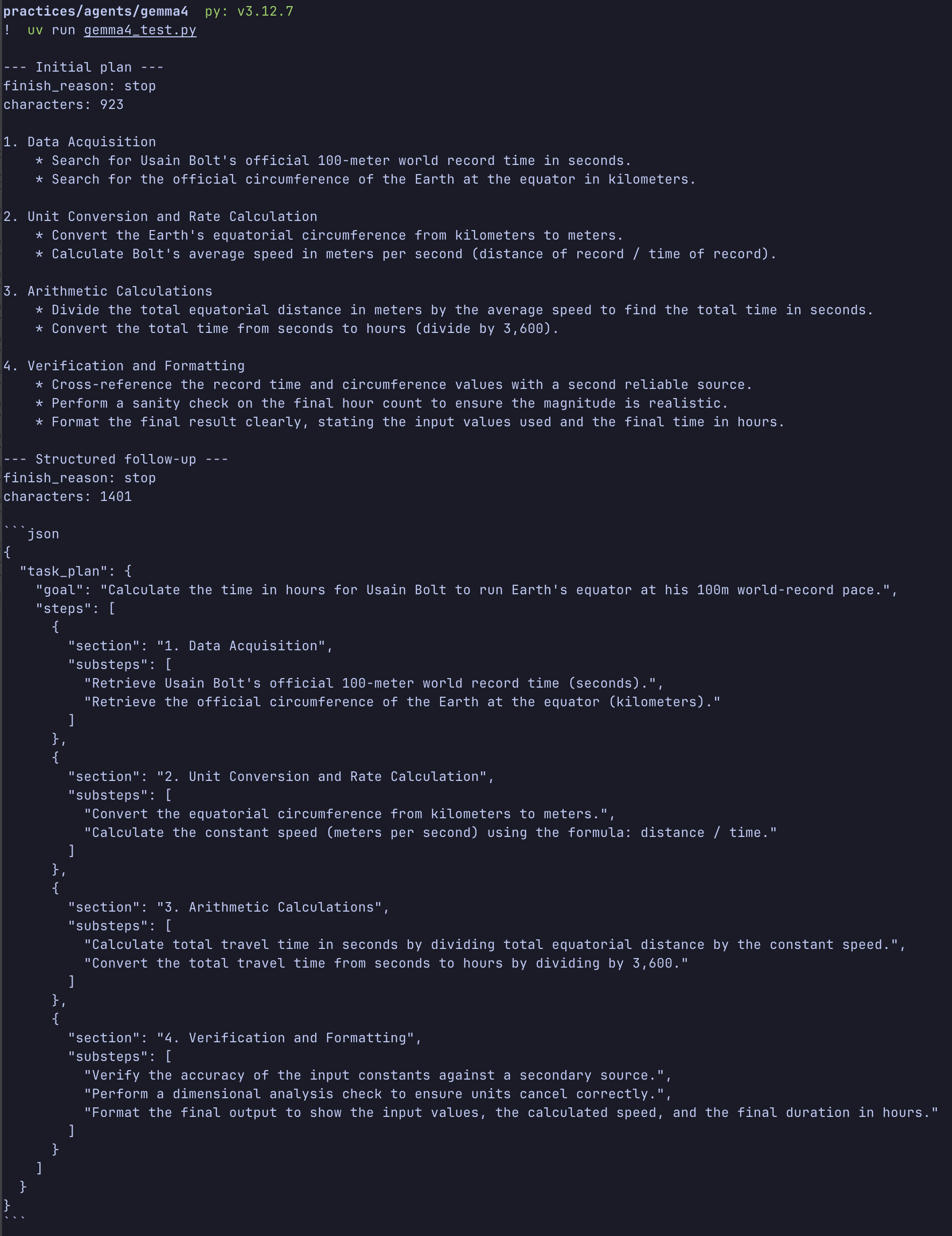
This was the part that had looked broken in Open WebUI. Through the direct API call, however, the response completed normally. The script printed the finish reason and character count for both responses. The initial plan ended normally, and the structured follow-up also ended normally. In other words, the model server returned a complete response. For this specific case, the truncation I saw in Open WebUI was probably not a Gemma 4 failure. It was more likely a UI or configuration issue somewhere above the model API.
That small result was useful by itself, but it also gave me a nice entry point into thinking about agents. An LLM by itself is not really an agent. It receives input and generates output. The agent-like behavior usually comes from the framework around it: the code that keeps track of the conversation, decides when to call tools, appends tool results, and asks the model what to do next.
The simplest version is just LLM plus tools plus loop. The LLM reads the current context and decides what should happen next. The tools allow the system to do things the model cannot do reliably on its own, such as search the web, read files, run code, query an API, or calculate something exactly. The loop ties them together. It sends messages to the model, receives a response, checks whether a tool is needed, runs the tool if necessary, appends the tool result to the message history, and calls the model again.
My little Gemma 4 script does not implement tool calling yet, but it already contains the beginning of that shape. There is a message history. There is a first model call. There is an assistant response. There is a second user message. Then there is another model call using the expanded history. That is not an agent yet, but it is the smallest useful piece of one. Once a tool call is added between turns, the same structure becomes much more interesting.
This also helped clarify a question I had been carrying around: where is the memory? When people use chat interfaces, it is easy to imagine that the model itself remembers the conversation somewhere inside. I also wondered at one point whether this had something to do with the Transformer attention cache. I was thinking vaguely about “QKV cache,” though the usual term is KV cache. During generation, Transformer inference systems cache key and value tensors from previous tokens so they do not have to recompute everything for each new token. That cache matters a lot for performance, especially with long contexts, but it is not memory in the product sense.
The practical memory of a basic agent usually belongs to the framework, not the model. The framework stores the system prompt, user messages, assistant messages, tool calls, and tool results. On the next turn, it sends the relevant history back to the LLM. The model appears to remember because the framework is giving it the conversation again. If the conversation becomes too long, the framework has to decide what to keep, summarize, retrieve, or discard. More advanced systems can add explicit memory stores, vector databases, user profiles, task state, or files, but the basic principle is the same: the surrounding program manages the continuity.
This is close to what people now call harness engineering. The word is useful because it shifts attention away from the model alone and toward the system wrapped around it. In this sense, most agentic frameworks are a kind of harness. They decide how message history is stored, how tools are exposed, how intermediate results are appended, how errors are handled, when the model should be called again, and what constraints should be enforced along the way.
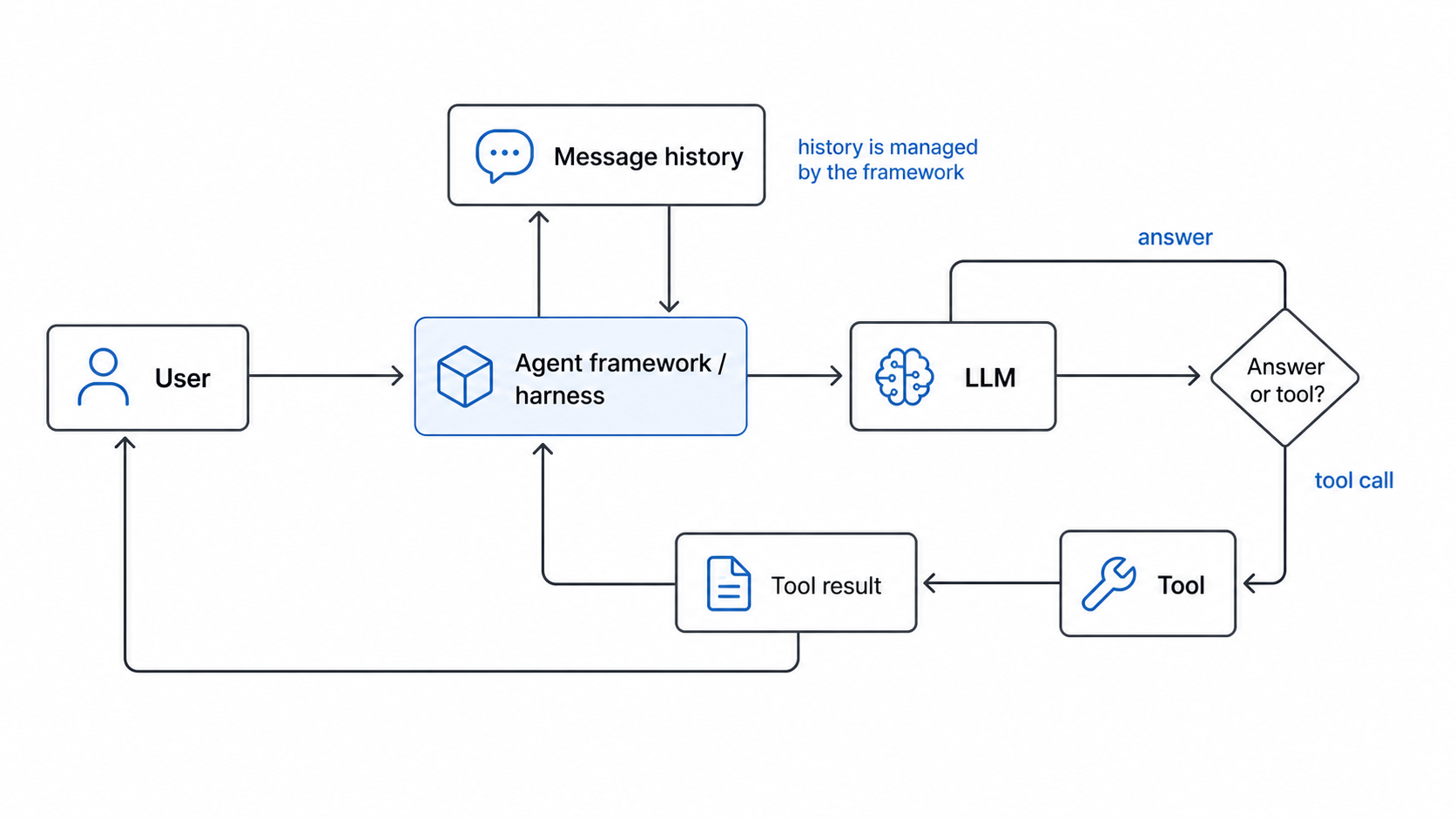
Different frameworks make different choices for these problems. One framework may emphasize graph-based control flow. Another may emphasize tool schemas, memory stores, retries, evaluations, or human approval steps. But the basic job is similar: build enough structure around the LLM that its outputs can become part of a reliable loop. This is also where user-written rules fit in. When we add project instructions, system prompts, tool descriptions, repository conventions, or validation checks, we are not changing the model itself. We are shaping the harness. We are telling the surrounding framework how to guide the model, what context to preserve, what actions are allowed, and how to recover when the model does something unhelpful.
This distinction matters when debugging local models. If a response is truncated, malformed, or missing context, the cause may not be “the model is bad.” It may be that the UI did not display the full stream, the client limited the output tokens, the framework failed to append the right history, or the server interpreted the request differently than expected. Calling the model directly through a small script removes some of those layers and makes the failure easier to locate.
That is one reason I have been enjoying “Build an AI Agent from Scratch” (by Jungjun Hur and Younghee Song). The book’s framing is useful because it treats agents as understandable software systems rather than magic personalities. Planning, tool use, memory, retrieval, and reflection are not mysterious if you build them one piece at a time. The model is important, but the framework around the model is what turns isolated text generation into an iterative workflow.
So this experiment was small, but it changed how I interpreted the Open WebUI issue. Gemma 4 was not obviously failing at the structured-output request. When called directly, it produced the full response and stopped normally. The strange trimming was more likely in the client layer. More importantly, the test made the agent framework feel less abstract. A basic agent is not a giant architecture diagram. It starts with a message list, a model call, a possible tool call, an appended result, and another model call.
That is the loop I want to build toward next. Not because this tiny script is impressive by itself, but because it makes the boundaries visible. The model generates. The framework remembers. The tools act. The loop gives the whole thing continuity.